
When Should a Business Choose Custom Software Development?
This article explains when a business should move beyond generic SaaS tools and consider custom software development. It covers workflow fit, system integration, manual work, data visibility, legacy modernization, competitive advantage, AI readiness, and a practical build-buy-customize decision framework.
Most businesses do not start by saying, “We need custom software.”
They start with a more practical problem.
A sales team is missing follow-ups.
An operations team is still coordinating work through spreadsheets.
A finance team spends days reconciling data from different platforms.
A customer service team cannot see the full customer history.
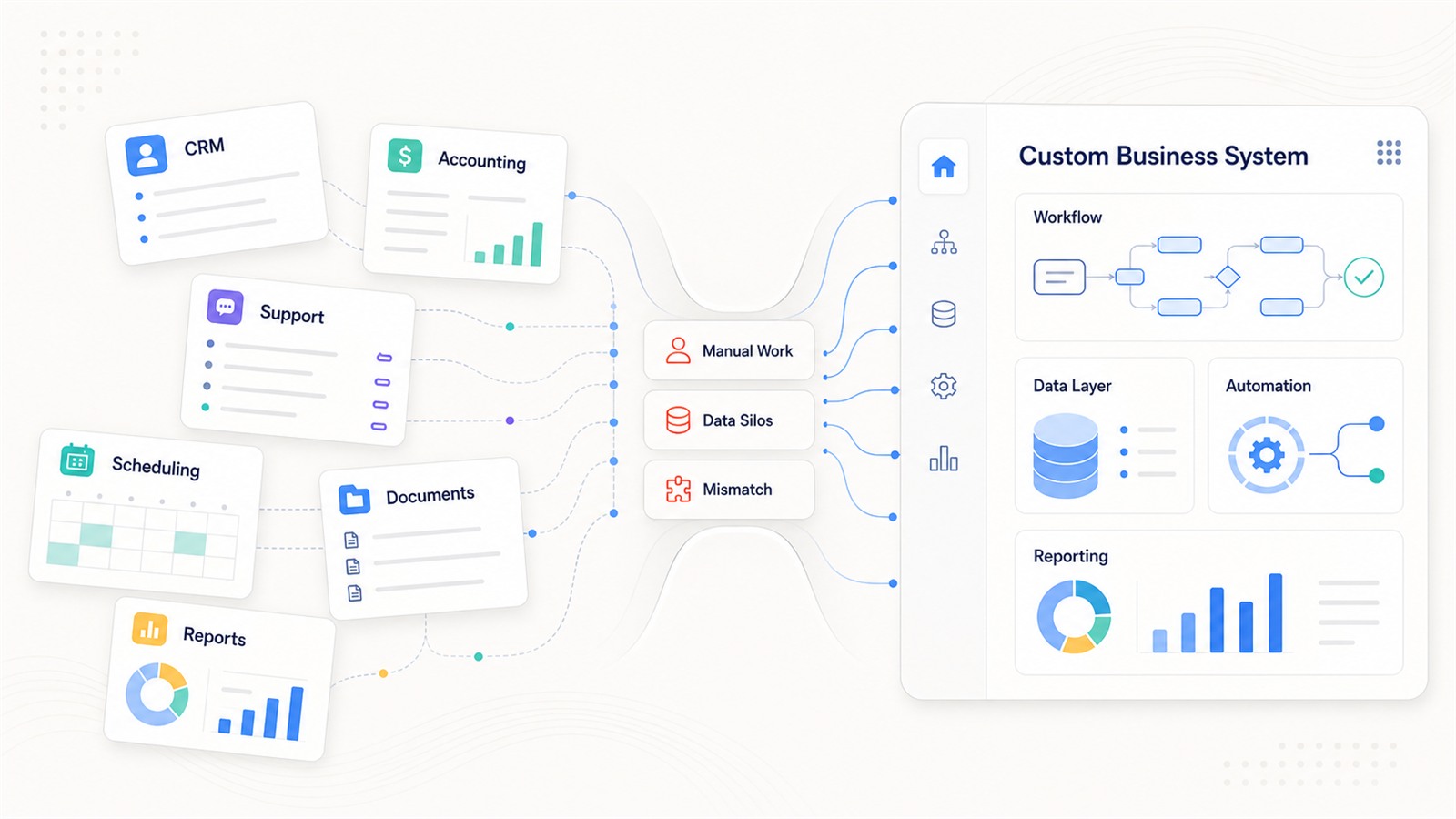
Management wants better visibility, but the data is scattered across too many tools.
At first, buying software is usually the right move. A good SaaS tool can help a company move faster, test new processes, and avoid the cost of building everything from scratch.
But as the business grows, the question changes.
It is no longer only:
“Which tool should we buy?”
It becomes:
“Can our systems support the way our business actually works?”
That is the point where custom software development becomes worth serious consideration.
Why This Question Matters Now
Software is becoming more central to how companies operate, not less.
According to Gartner’s 2026 worldwide IT spending forecast, worldwide IT spending is expected to continue growing in 2026, with software remaining one of the strongest areas of enterprise technology investment.
At the same time, AI is changing what companies expect from software.
Teams no longer want systems that only store data. They want systems that can automate workflows, connect departments, support AI agents, and provide real-time business visibility.
But AI does not work well on top of messy operations.
If company data is fragmented, workflows are unclear, and legacy systems cannot connect with modern tools, AI becomes another isolated layer instead of a real business capability.
The 2026 MuleSoft Connectivity Benchmark Report highlights this clearly: 96% of surveyed IT leaders agree that the success of AI agents depends heavily on seamless, debt-free data integration. The same report also points to common barriers such as governance gaps, system silos, and isolated AI agents.
This is why custom software development is becoming more important for many growing businesses.
It is not just about building a new app.
It is about creating the operational infrastructure that allows the company to scale, integrate, automate, and eventually use AI in a practical way.
What Is Custom Software Development?
Custom software development means designing and building software around a company’s specific workflows, users, data, systems, permissions, and business goals.
It can include:
- internal business platforms
- customer portals
- CRM or ERP extensions
- workflow automation systems
- reporting dashboards
- AI-enabled business applications
- legacy system modernization
- integrations between existing tools
- role-based permission and approval systems
The goal is not to build technology for its own sake.
The goal is to remove operational friction.
A strong custom software development company should not begin by asking, “What features do you want?”
It should ask:
- Which business process is slowing you down?
- Which teams are repeating manual work every day?
- Which systems do not talk to each other?
- Where do delays, errors, or missed opportunities happen?
- What business result should this system improve?
That distinction matters.
Custom software is not just a development project. It is a business system decision.
When SaaS Is Usually Enough
Before choosing custom development, a business should be honest about whether an off-the-shelf tool can solve the problem.
SaaS is usually enough when:
- the process is common across many companies
- your team can adapt to the software’s workflow
- integrations are simple
- reporting requirements are basic
- the process is not a major source of competitive advantage
- the tool does not create heavy manual work elsewhere
For example, most companies do not need to build their own email system, basic accounting software, project management tool, or standard help desk platform.
If a SaaS product solves 80% to 90% of the need without creating serious workarounds, buying is usually better than building.
The problem starts when the company keeps adding spreadsheets, manual exports, duplicate data entry, and side processes just to make the software fit the business.
At that point, the tool may still be usable, but the workflow is no longer healthy.
Sign 1: Your Workflow No Longer Fits Standard Software
One of the clearest signs that a business needs custom software is workflow mismatch.
This often happens in traditional industries and operationally complex businesses: automotive dealerships, logistics companies, healthcare providers, manufacturing companies, finance teams, legal services, retail operations, and cross-border businesses.
The company may already use multiple SaaS tools, but the real workflow still happens through email, spreadsheets, phone calls, messaging apps, and manual approvals.
Common symptoms include:
- employees entering the same data into multiple systems
- managers asking teams for updates manually
- approvals happening outside the system
- customer information being scattered across tools
- employees creating spreadsheets to compensate for software limitations
- reports taking days to prepare because data is fragmented
- no clear audit trail when something goes wrong
This is not only inefficient. It creates business risk.
When software does not match the workflow, employees eventually build unofficial workflows outside the system. Over time, the business loses control over data quality, process visibility, and accountability.
Custom software becomes valuable when the system needs to reflect how work actually moves across teams.
Sign 2: Your Systems Do Not Connect
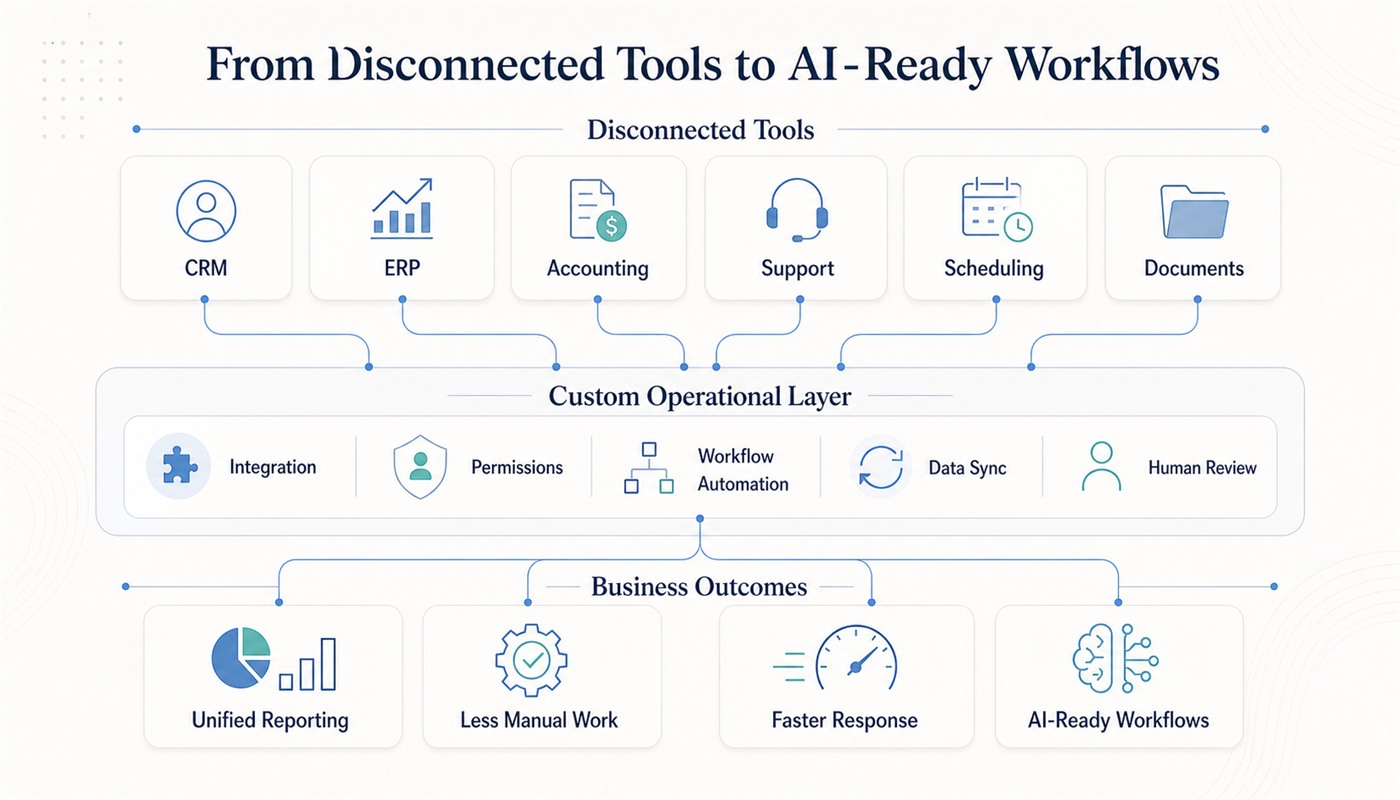
Modern businesses rarely run on one tool.
A company may use a CRM, accounting software, scheduling platform, customer support system, document database, payment gateway, inventory system, and internal reporting tools.
The issue is not whether each tool works on its own.
The issue is whether they work together.
This becomes even more important when a company wants to deploy AI. An AI system cannot reliably support a workflow if it cannot access the right data, write back to the right system, follow permission rules, and trigger the next step.
This is one reason many AI projects fail after the demo stage. The demo may look impressive, but real deployment requires data access, system integration, governance, human review, monitoring, and measurable outcomes.
We discussed this in more detail in Production AI Deployment: How to Move From Demo to Real Workflow Automation.
For many businesses, the right solution is not to replace every existing tool. The better approach is to build a custom operational layer that connects the tools already in use.
That layer can centralize data, automate handoffs, reduce duplicate entry, and create a cleaner workflow across departments.
Sign 3: Your Team Depends on Too Much Manual Work
Manual work is not always bad.
Some decisions should involve people, especially when customer relationships, risk, compliance, pricing, or exceptions are involved.
The problem is repetitive manual work that does not require judgment.
Examples include:
- copying data from one system to another
- preparing the same report every week
- manually assigning leads or tickets
- checking appointment availability by hand
- reconciling documents across systems
- sending routine follow-up messages
- chasing internal approvals
- updating customer records after every interaction
These tasks may look small individually, but they compound across the company.
They slow down response times, increase labor cost, create errors, and make performance harder to measure.
Custom software can automate these workflows while keeping humans in control where judgment matters.
For example, a system can automatically route leads, create tasks, update CRM records, trigger follow-up reminders, or generate reports. But it can still require human approval for high-value deals, unusual customer requests, compliance-sensitive actions, or financial exceptions.
This is also where AI workflow automation becomes more practical.
AI should not only generate content. It should help move real work through a controlled process.
If your company is comparing general-purpose AI tools with workflow-ready systems, this related article may help: Custom AI Solutions vs. Off-the-Shelf AI Tools: How Should Businesses Choose?.
Sign 4: Management Cannot See the Business Clearly
Many companies do not lack data.
They lack usable data.
Sales data may live in the CRM.
Customer service data may live in a help desk.
Finance data may live in accounting software.
Operations data may live in spreadsheets.
Management reports may depend on manual exports and last-minute cleanup.
The result is slow decision-making and inconsistent reporting.
Custom software can help by creating a business-specific data layer. Instead of forcing management to interpret disconnected dashboards, a custom system can organize data around the metrics that actually matter.
Examples include:
- lead response time
- appointment booking rate
- missed call rate
- order processing time
- approval cycle time
- customer support resolution time
- revenue by workflow stage
- workload by team or location
- manual hours saved through automation
Good software does more than store information.
It helps leadership understand where the business is slowing down, where opportunities are being lost, and which workflows should be improved next.
Sign 5: Your Legacy System Is Holding Back Growth
Legacy systems do not always look broken.
Often, they still run the business every day. That is why they are hard to replace.
But they become a problem when they are difficult to update, hard to integrate, expensive to maintain, or dependent on a few people who understand how they work.
Common signs include:
- new features take too long to add
- integrations are difficult or impossible
- reporting requires manual exports
- employees avoid using the system
- permissions and security controls are outdated
- the system cannot support modern cloud, mobile, or AI-enabled workflows
- maintenance depends on outdated technology or unavailable developers
Legacy system modernization is not only a private-sector concern. Japan’s Ministry of Economy, Trade and Industry has continued to highlight legacy systems as an obstacle to digital transformation, including in its 2025 Legacy Systems Modernization Committee report.
For businesses, modernization does not always mean replacing everything at once.
A safer approach is often staged modernization:
- map the current system and business-critical workflows
- identify which modules create the most risk or delay
- create APIs around important data
- rebuild high-impact workflows first
- improve user interfaces for operational teams
- connect legacy systems with modern reporting and automation layers
The goal is not modernization for appearance.
The goal is to remove technical debt that prevents the business from moving faster.
Sign 6: The Workflow Is Core to Your Competitive Advantage
Not every workflow deserves a custom system.
Some processes are generic. Others define how the company competes.
Examples include:
- how an automotive dealership follows up with leads
- how a logistics company coordinates dispatch
- how a healthcare provider manages appointment requests
- how a finance team reviews documents
- how a service business handles booking and customer communication
- how a manufacturer manages work orders and production updates
- how an import-export business handles documents, payments, invoices, and reconciliation
If the workflow directly affects revenue, customer experience, operational speed, or service quality, relying entirely on generic software may limit the business.
This is where custom software creates strategic value.
It allows the company to design a system around its own operating model instead of forcing the operating model into someone else’s template.
For example, in finance operations for import-export businesses, the problem is rarely “lack of accounting software.”
The real problem is that payments, invoices, currencies, freight documents, customs records, and approval workflows rarely follow a clean standard pattern. This is why custom development can be more effective than forcing complex operations into a generic tool.
You can read a related ZenAI case study here: Why Finance Automation for Import-Export Businesses Requires Custom Software Development.
When Custom Software Is Not the Right Choice
Custom software can be powerful, but it is not always the right answer.
A business should be cautious if:
- the requirement is still unclear
- the process changes every week
- there is no internal owner for the project
- the team is not ready to change how it works
- a standard SaaS product already solves the problem well
- the expected business value is too small to justify the investment
The best custom software projects start with a clear operational pain point.
They do not start with a vague request to “build a platform.”
Before investing in custom development, businesses should define:
- what problem the system must solve
- who will use it
- which existing systems it must connect to
- which workflow it must support
- what success will be measured by
- what should be automated
- what should remain human-led
A good development partner should help clarify the workflow before writing code.
A Simple Build, Buy, or Customize Framework
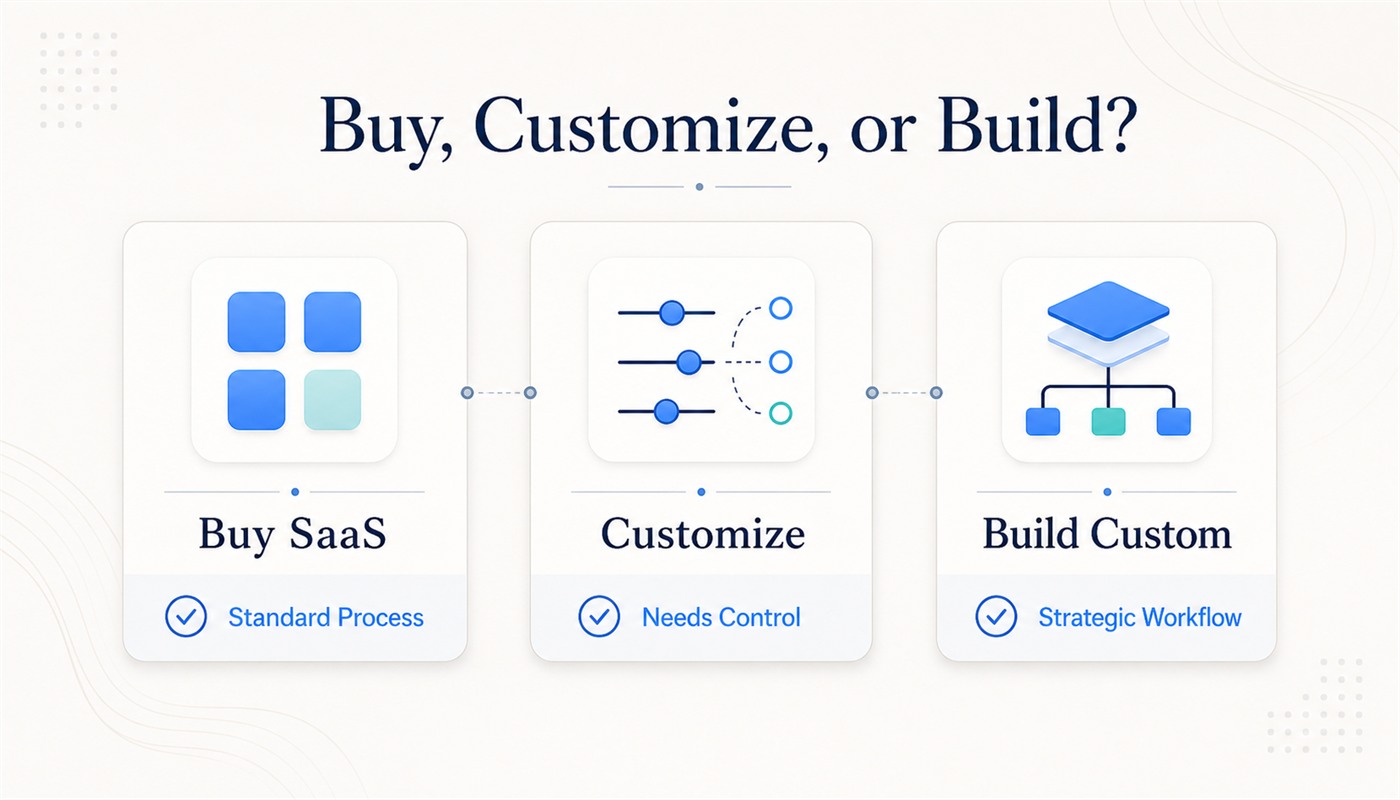
A practical way to decide is to divide business needs into three categories.
Buy
Choose SaaS when the workflow is standard, the tool is mature, and your team can adapt without major workarounds.
Customize
Customize or integrate existing tools when the core system is useful, but your business needs better workflows, dashboards, automation, permissions, or data connections.
Build
Choose custom software development when the workflow is business-critical, too specific for standard tools, or requires deep integration across teams and systems.
Most companies do not need to build everything.
The best answer is often a hybrid approach: use standard tools where they work, customize where the business needs control, and build only where the workflow creates real competitive value.
How AI Changes the Custom Software Decision
AI is making this decision more important.
The 2025 Stack Overflow Developer Survey found that 84% of respondents are using or planning to use AI tools in their development process. AI is becoming part of how software is built, tested, documented, and maintained.
But this does not mean every company can solve business problems by buying an AI tool.
AI can accelerate development and improve productivity, but business value still depends on the system around it:
- clean data
- connected systems
- clear workflows
- role-based permissions
- human review points
- monitoring
- evaluation
- security
- measurable business outcomes
This is especially true for AI agents. As we explained in AI Agents in 2026: From OpenClaw and Hermes Hype to Enterprise-Ready Workflow Automation, the real enterprise question is not whether an agent can perform a task in a demo. It is whether that agent can operate safely inside business workflows.
Custom software development often provides the foundation for that kind of AI readiness.
How ZenAI Supports Custom Software Development
At ZenAI, we build practical software systems for companies that need technology to support real business operations.
That may include:
- custom business platforms
- internal tools
- workflow automation systems
- CRM and ERP integrations
- reporting dashboards
- AI-enabled business applications
- legacy system modernization
- operational data layers
Our approach starts with the workflow, not the feature list.
We help businesses identify where manual work, disconnected systems, outdated processes, and unclear data are slowing growth. Then we design software that connects the right systems, automates the right steps, and gives teams better visibility into daily operations.
For companies exploring AI, this foundation matters even more.
AI applications cannot create reliable value if they are not connected to real workflows, business systems, permissions, and measurable outcomes.
Custom software development is often the infrastructure that makes practical AI adoption possible.
FAQ
Is custom software development better than SaaS?
Not always. SaaS is usually better for standard business needs. Custom software is better when workflows are unique, integrations are complex, data is fragmented, or the process directly affects business performance.
How do I know if my company needs custom software?
You may need custom software if your team relies heavily on spreadsheets, duplicate data entry, manual approvals, disconnected systems, or workarounds that slow down operations.
Is custom software only for large enterprises?
No. Growing businesses often benefit from custom software when their operations become too complex for standard tools. The key factor is not company size, but workflow complexity and business impact.
Can custom software work with our existing tools?
Yes. Many custom software projects are designed to integrate with existing tools such as CRM, ERP, accounting software, scheduling systems, customer support platforms, payment systems, and internal databases.
Should we replace our legacy system or modernize it gradually?
In many cases, gradual modernization is safer. Businesses can start by improving the most critical workflows, building APIs, automating manual processes, or creating a new interface around existing systems.
Final Thought
Custom software development is not about building more technology.
It is about building the right business infrastructure.
When standard tools no longer fit your workflow, when systems do not connect, when manual work slows down teams, when management cannot trust the data, or when legacy systems limit growth, custom software becomes more than a technical option.
It becomes a way to redesign how the business operates.
The better question is not:
“Should we build software?”
The better question is:
“Which business process is important enough to deserve a system built around it?”
If that process affects revenue, customer experience, speed, compliance, or scalability, custom software may be worth serious consideration.
Discuss Your Custom Software Project
Need a system that fits the way your business actually works?
Book a demo with ZenAI to discuss how custom software development can support your workflows, data, integrations, and AI readiness.
If the requirement is specifically a browser-based business system with authentication, workflow logic, data, and integrations, see ZenAI's custom web application development services.
Was this article helpful?
Related Articles
What is Hermes Agent? The Best AI Agent Partner for Business
Hermes Agent is an open-source, self-improving AI agent framework designed for enterprises that need more than single-turn chatbots. With persistent memory, autonomous skill creation, lightweight private deployment, and workflow execution capabilities, Hermes Agent can support manufacturing, cross-border B2B lead generation, and SME office automation while helping businesses reduce repetitive work and build reusable operational intelligence.
Read MoreGoogle Search Is Becoming an AI Agent Layer. What Should Enterprises Do Next?
Google’s latest Search update is more than a product announcement. It signals a broader shift from search as an information-retrieval tool to search as an AI-powered execution layer. As AI agents become part of everyday discovery, businesses will need clearer website content, stronger GEO strategies, and workflow systems that can support faster, AI-assisted customer journeys.
Read More