
AI Technical Support Voice Agent: From Calls to Support Tickets
Build an AI technical support voice agent around your product knowledge, CRM, and ticketing system, with verified support tickets and reliable human handoff.
A customer calls because a device is displaying an error code. The support engineer is unavailable. The caller needs to know what information to provide, whether an approved check is available, and what happens next.
An AI technical support voice agent can help with this first stage: identify the product, retrieve relevant approved guidance, collect the issue details, and create a support ticket through an authorized integration. The useful outcome is a supported answer or a request that reaches the right team with enough context to act.
For manufacturers and hardware businesses, this requires a workflow built around their products, support rules, and existing software. A generic phone-answering script cannot determine which manual applies or whether a service record was actually saved.
Which technical support calls can AI handle?
Start with repeatable calls where the allowed response and next action are clear.
Caller request | Suitable first-stage automation | Required condition |
|---|---|---|
A question about normal product use | Retrieve and explain approved instructions | Match the product model and version |
A reported error code | Capture the code and retrieve an approved support procedure | Verify the match and escalation rules |
An existing service request | Look up the permitted ticket status | Authenticate the caller as required |
An unresolved product issue | Collect details and create a support ticket | Use an authorized interface and confirm the result |
A request for an engineer | Transfer the call with context or arrange follow-up | Follow the team's actual availability |
A complex or safety-related fault | Apply the approved escalation procedure | Keep diagnosis and high-impact decisions with qualified staff |
An AI customer support voice agent should operate within a defined support scope. For example, it may explain an approved setup instruction but should not invent a repair procedure, bypass a safety control, or make an unsupported warranty commitment.
Find the right product knowledge before giving instructions
The same symptom can mean different things across product models and firmware versions. Before retrieving instructions, the workflow should establish the information needed to choose the correct source.
That might include the product family, model number, software version, exact error text, and the circumstances in which the problem appeared. If a spoken identifier is uncertain, the agent can ask the caller to repeat or spell it. It should preserve unresolved uncertainty in the record.
The knowledge layer needs more than a folder of manuals. Documents should have an owner, an approval status, a product association, and a revision date. Retired instructions need a clear removal process.
Microsoft's Copilot Studio knowledge documentation describes connecting agents to documents and enterprise data, with authentication requirements for sources such as SharePoint and Dataverse. This illustrates an available knowledge integration approach; it does not make every document suitable for customer-facing guidance.
For a custom voice workflow, define how the agent selects the applicable material and what it does when the source is missing, conflicting, or outside scope. Retrieval alone does not guarantee a correct answer. Test the returned guidance against approved support examples and maintain a human escalation path.
Connect the voice workflow to your existing systems
The implementation should start with the systems your team already uses.
The phone platform handles the call. Approved product knowledge supplies supported guidance. The CRM may identify the customer or account. The ticketing system owns the service request. A support queue or on-call process determines who takes over.
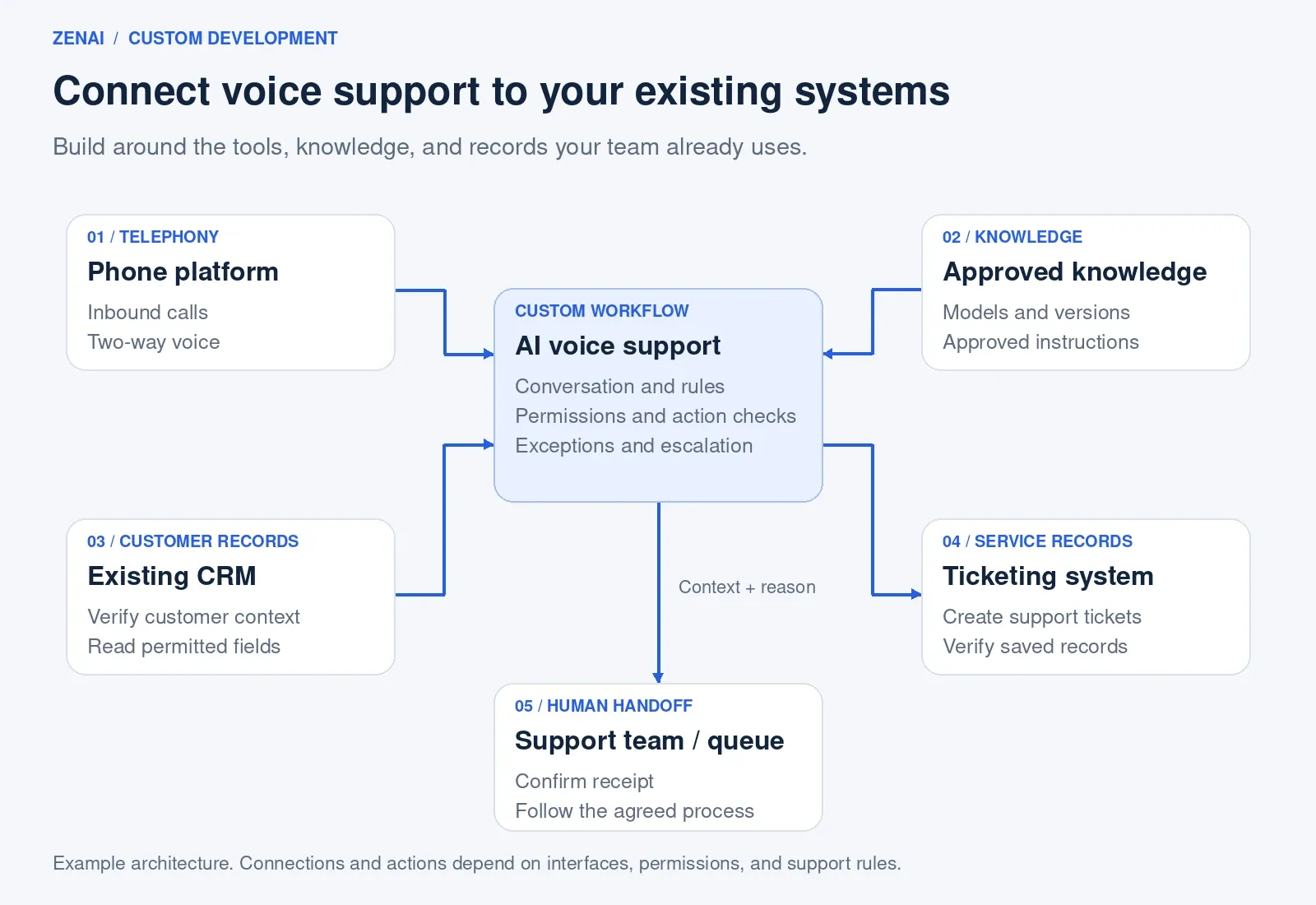
Example integration architecture. Available actions depend on the customer's interfaces, permissions, and support rules.
These connections need a clear division of responsibility. A caller's phone number, for instance, may help locate an account but may not be sufficient to authorize disclosure of service history.
AI voice agent CRM integration should specify:
- Which system owns each record and field.
- What the agent may read, create, or update.
- How customer and product identifiers are validated.
- How existing requests are checked before creating a new one.
- What happens when an interface times out.
- Which team owns unresolved integration failures.
For businesses with custom software or legacy service tools, an integration assessment should establish which operations are actually supported. Some environments may allow ticket creation immediately; others may require an adapter, a reviewed intake queue, or additional application development.
Turn the call into a verified support ticket
Consider an illustrative call from a customer whose device shows an error message. The agent confirms the product details and checks for a matching approved procedure.
If an allowed instruction is available, it can guide the caller through that instruction and ask about the result. If the issue remains unresolved, it should capture what happened and move the request into the agreed service process.
The ticket could include:
- Customer and contact details collected under the approved policy.
- Product model and validated identifiers.
- The caller's issue description and exact error text.
- Relevant operating context.
- Steps already attempted and the reported result.
- The reason for escalation.
- The assigned queue and verified ticket reference, when available.
Before telling the caller that a ticket has been created, the application should check the ticketing system's response and, where necessary, retrieve the saved record.
A timeout needs special handling. The system may have saved the ticket even though the confirmation did not arrive. Check the operation status or use duplicate prevention before retrying.
If creation cannot be verified, tell the caller what is known. Retain the request through the agreed fallback process and avoid claiming that an engineer has received a ticket that may not exist.
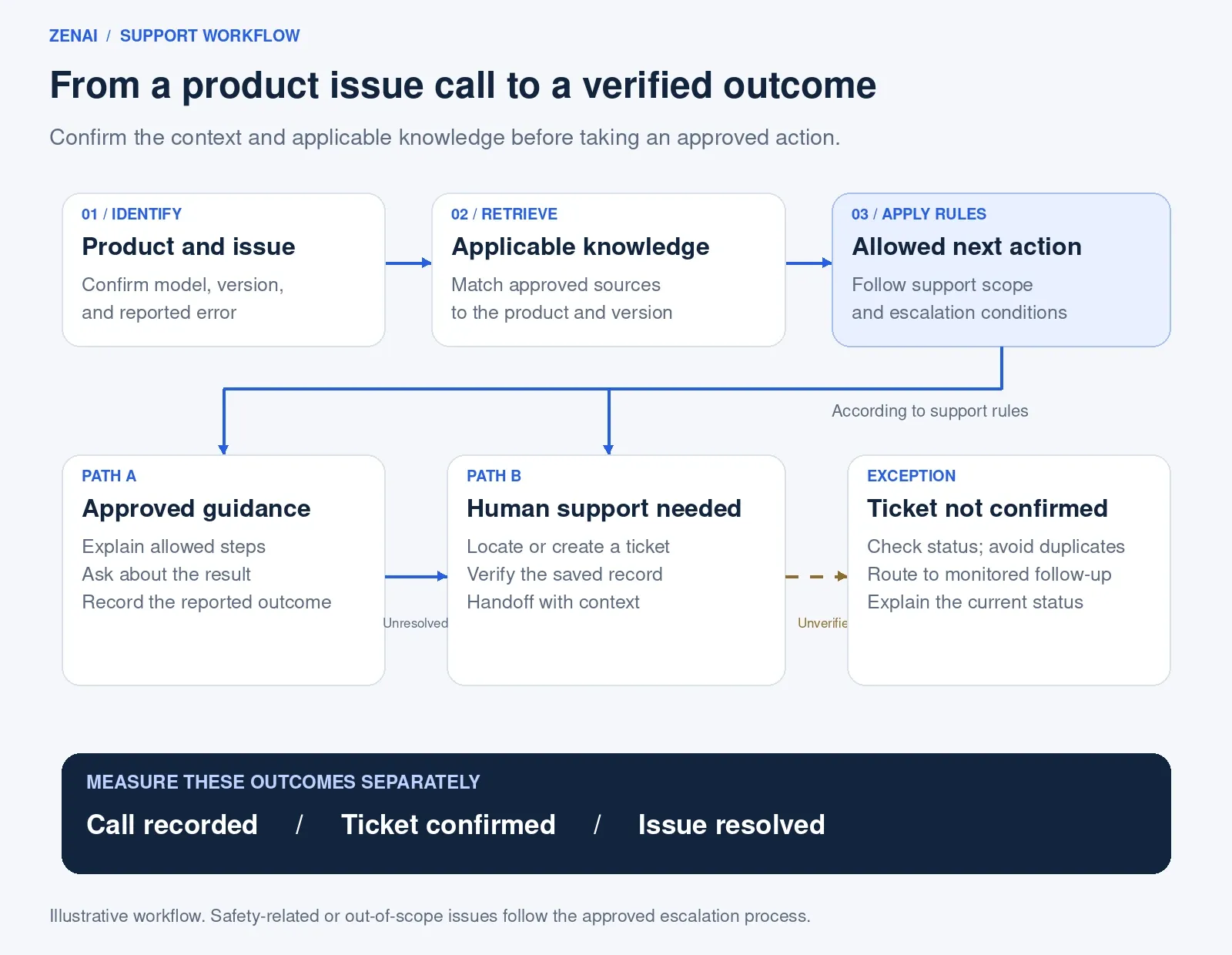
Illustrative support workflow. A logged call, a confirmed ticket, and a resolved product issue are separate outcomes.
Give the engineer the context needed to continue
Human handoff should carry the information already collected, so the engineer can continue the conversation.
A useful handoff includes the product, issue, relevant source consulted, attempted steps, customer feedback, and reason for escalation. Keep the customer's own description distinguishable from the agent's interpretation.
Twilio's ConversationRelay and Flex integration tutorial demonstrates passing context into a human support workflow. It also explains that implementations using another contact center need to adapt the target integration.
Define a fallback for unanswered transfers. Depending on the business, this could be a monitored callback queue or an established on-call process. Confirm receipt before saying a handoff has succeeded, and only promise a callback time that the support team has authorized.
When does custom development make sense?
An existing service may be sufficient when the task is limited to answering basic questions and taking a message.
Custom development becomes more relevant when product knowledge, customer records, service permissions, ticket fields, and escalation rules need to work together across several systems. The choice should follow a review of the required workflow and available integrations.
Useful scoping questions include:
- Which product families and call types are in scope?
- Who approves and maintains the support knowledge?
- Which existing systems must remain the sources of truth?
- What should the agent do when a model or error code is unclear?
- Which actions require a person?
- How will the business verify saved tickets and successful handoffs?
These answers determine the implementation scope and acceptance criteria.
Pilot one support workflow and measure the result
A focused first release might cover one product family, a small set of approved questions, one service queue, and a limited group of callers.
Test unclear model numbers, similar error codes, missing knowledge, outdated documents, existing tickets, interface failures, caller interruptions, and unavailable engineers. Include situations where the correct outcome is a handoff.
Measure the business result alongside call quality.
Measure | What it tells you |
|---|---|
Approved-answer accuracy | Whether audited responses match the applicable approved source |
Ticket creation success | Whether eligible creation attempts produce verified records |
Ticket completeness | Whether required fields are present and usable |
Duplicate ticket rate | Whether the workflow creates avoidable repeat requests |
Handoff success | Whether the intended team or monitored follow-up queue receives the request |
Repeat contact | Whether customers need to contact support again for the same issue |
Reviewed resolution | Whether the issue was resolved, using a defined confirmation method |
Set denominators and exclusions before launch. A transfer request is not a completed handoff, and creating a ticket does not prove that the device problem has been fixed.
How ZenAI can help build your voice support workflow
ZenAI's AI Voice Agent Development Services provide a starting point for assessing call flows, telephony integration, permitted CRM actions, human handoff, testing, and production monitoring.
For technical support projects, the scope can be defined around your product knowledge and service process. ZenAI's AI Integration Services address connections to existing software, including permissions, field mapping, controlled updates, and interface failure handling.
The engagement begins with discovery: review representative support calls, inspect available interfaces, select one workflow, and agree on acceptance criteria. The resulting system is developed around your operating requirements.
Bring a typical support call, an approved product guide, and the name of your current ticketing system. Discuss a custom AI voice support workflow with ZenAI.
Frequently asked questions
What is an AI technical support voice agent?
It is a voice application configured to handle defined product support calls using approved knowledge and authorized business actions, such as creating tickets or requesting human assistance.
Can it use our product manuals and knowledge base?
Potentially. The project must assess document quality, product and version mapping, access permissions, retrieval behavior, and the process for keeping guidance current.
Can it connect to a custom CRM or ticketing system?
Integration depends on supported interfaces and permissions. An assessment can determine whether direct access, an adapter, or additional software work is required.
Can AI diagnose every equipment fault?
No. The support scope should define which approved instructions it may provide and which issues require qualified staff.
Do we need to replace our existing support software?
Not necessarily. A custom workflow can be designed around existing systems where suitable access is available.
Can ZenAI develop a workflow specific to our business?
ZenAI offers custom voice agent development and system integration services. A project assessment establishes the call types, knowledge sources, integrations, handoff rules, and delivery scope.
Was this article helpful?
Related Articles
AI Voice Customer Support for Medical Devices: After-Hours Calls and Troubleshooting
Explore AI voice customer support for medical device companies: handle after-hours calls, approved troubleshooting, support tickets, and safe human handoff.
Read MoreAI Readiness Assessment: 10 Questions to Answer Before Starting an AI Pilot
Assess AI readiness before an AI pilot by checking business goals, data, systems, governance, ownership, risk, and production support.
Read MoreHuman-in-the-Loop AI Agents: Where Should Businesses Require Approval?
Learn where AI agents need human approval, which actions can stay automated, and how to design approval gates, exception paths, audit logs, and monitoring.
Read More