
Sales Order Entry Automation from Email to ERP
A practical guide to scoping email-to-ERP sales order entry automation, with a unit-conversion example, implementation choices, a transparent handling-time calculation and supplier evaluation questions.
Sales order entry automation can turn customer orders received by email into checked, reviewable records in your existing ERP. A practical first project should capture agreed document formats, match customers and products, validate quantities and units, and prepare an order for approval. Pricing conflicts, unclear items and amendments need an explicit review path.
For an operations team, the purchasing decision is whether this process will reduce total handling time without creating new order errors. That depends on the checks between the inbox and the ERP, and on how employees resolve the orders the system cannot complete.
This guide focuses on a supplier receiving a customer's purchase order and creating a sales order in the supplier's ERP. Automating your own purchasing from suppliers is a separate workflow.
What should your first project include
Start with a defined group of repeat customers, one shared inbox and one ERP environment. This lets your team compare the new process with the work employees actually perform today.
A proposed first scope could include:
- Capture order details from agreed PDF and spreadsheet formats.
- Match existing customers and approved customer-specific product references.
- Check required fields, units, quantities, prices and possible duplicates.
- Give employees the original document, proposed ERP fields and reasons for review.
- Create an approved sales record through a supported ERP mechanism and retain its processing history.
Agree the ERP stopping point before development. A quote, staging record or unreleased order can have different effects across products and configurations. Confirm whether creating it affects inventory, reservations or planning.
New customer creation, substitutions, credit overrides, fulfilment release and automatic customer confirmations can remain outside the first version. Include them later only when their rules and responsibilities are understood.
A worked example when boxes become individual items
The following is an illustrative design example, not a ZenAI customer case.
A customer emails a purchase order for 12 cartons of product C-104. Your ERP uses product SKU-781 and records stock in individual units. An approved mapping states that C-104 corresponds to SKU-781 and each carton contains 20 units.
The proposed order quantity is therefore 240 units. Correctly extracting the number 12 is insufficient to create the correct transaction.
The review should show the original line, customer product reference, matched ERP item, approved conversion and resulting quantity. If the carton size has not been agreed, the order should wait for clarification rather than receive a guessed conversion.
This is an established ERP data concept. Microsoft's Business Central documentation on units of measure explains base and alternate units and their conversion relationship. The implementation should use your approved item data.
If the customer later writes “please make that 14 cartons,” the proposed quantity becomes 280 units only after the amendment is identified and reviewed. Your process needs to distinguish a revision from a second order and decide how changes to an already released order are handled.
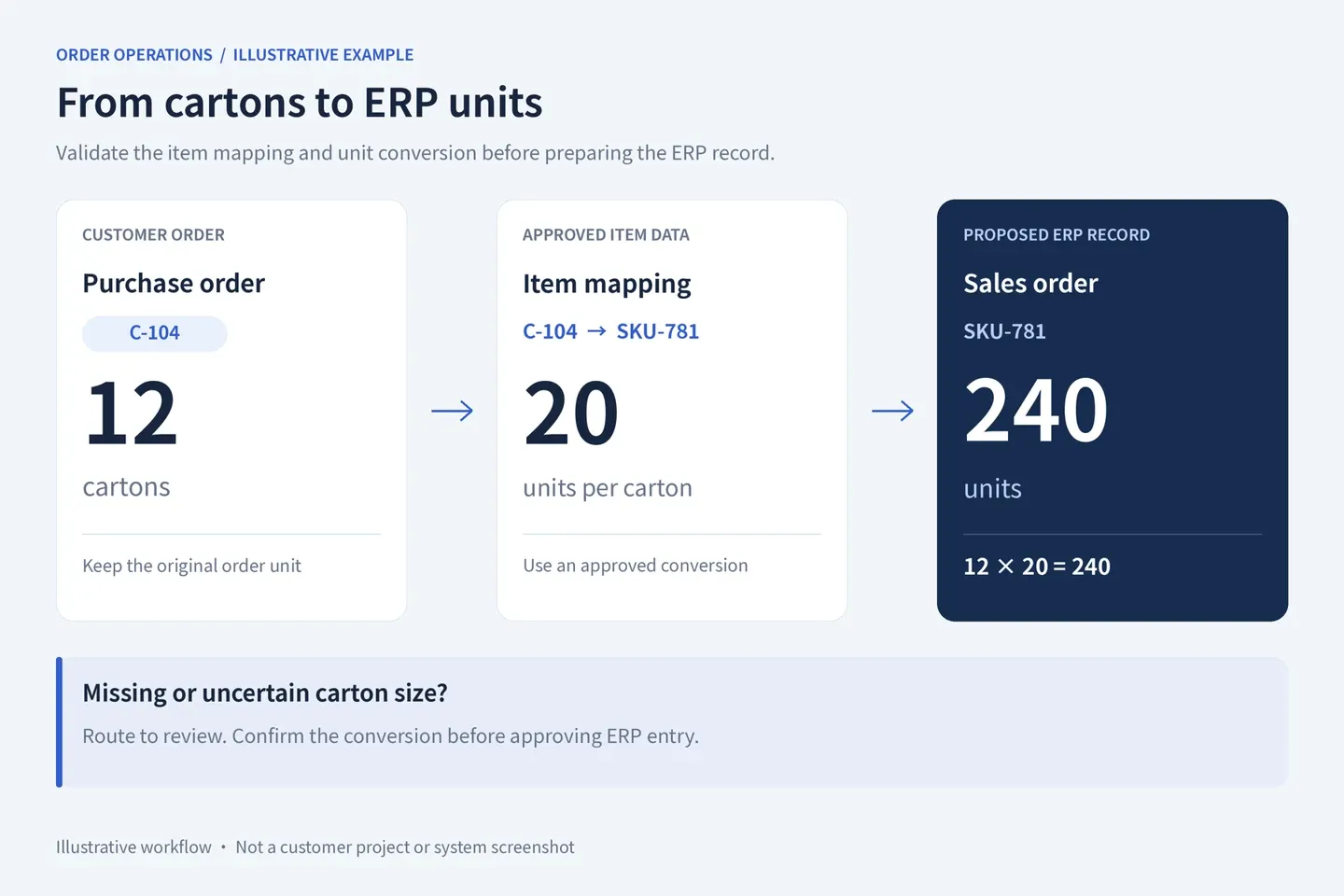
Illustrative example: 12 cartons × 20 units per carton = 240 units.
The checks that protect the order
Customer and item identity
Define how a sender is connected to an approved customer account, including forwarded messages and unfamiliar contacts. Use customer-specific item references where available. Similar product descriptions should not silently resolve an ambiguous item.
Prices quantities and delivery requests
Compare the requested unit and price with the relevant approved records. A clear PDF can still contain an outdated price. A requested delivery date should remain a request until your business has verified what it can commit to.
Duplicates amendments and failed writes
Use customer identity, the purchase order reference and processing history to identify possible duplicates. Agree how revised attachments and repeated references will be reviewed.
If the ERP connection times out, check whether the record was created before retrying. Assign the failure to an owner and make its status visible. Otherwise, employees may process the order manually while the automation later creates it again.
The first version can require approval for every proposed record. Selective automatic processing should follow testing and an explicit decision about which cases are eligible.
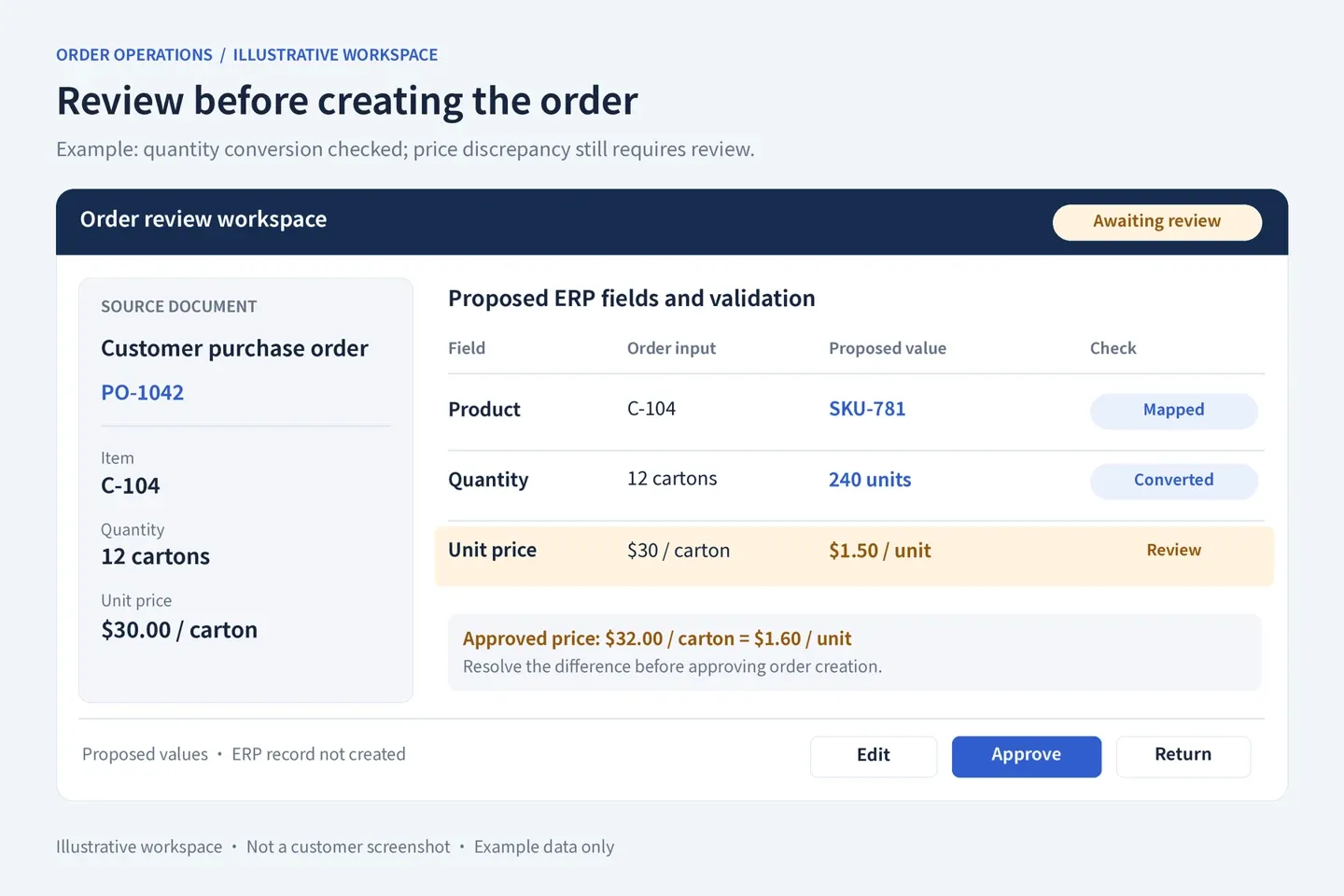
Illustrative workspace: the price discrepancy awaits review. No ERP record has been created.
Use existing ERP capabilities before adding software
Ask your ERP provider what the current product can already do. For example, Microsoft documents a Sales Order Agent for Business Central that processes customer email requests and supports quote and order creation with user review. Availability and fit still need checking for your environment.
Then compare three implementation routes.
Configure existing ERP features when they cover your intake formats, customer rules and approval needs. Check configuration effort, usage costs and what happens when a request cannot be processed.
Use an order-processing product with connectors when the document handling and ERP connection fit well. Test your actual line items, amendments and exception workload, rather than judging file-format support alone.
Commission a tailored integration or internal application when material gaps remain, such as customer-specific mappings, checks across several systems or a review process that standard interfaces do not support adequately.
A tailored implementation can reuse existing products. The supplier should explain which components it will configure, integrate or develop, and why each is needed.
Measure the employee work that remains
Measure current time spent entering, checking, correcting and resolving orders. Include the same activities after implementation, across all eligible orders, including exceptions.
Consider this hypothetical calculation, not a measured result or savings commitment:
- 1,000 eligible orders each month.
- Eight minutes of employee handling per order today.
- Three minutes per order after implementation, including review and exception handling.
- A reduction of 5,000 minutes, or approximately 83 hours a month.
At an assumed fully loaded cost of $35 an hour, that represents about $2,917 in monthly operating capacity before software, support and implementation costs.
Released time becomes a cash saving only under appropriate staffing or spending changes. It may instead help the team clear a backlog, reduce overtime or handle more orders. Use observed pilot data to replace these assumptions before making an investment decision.
Ask an implementation partner for evidence of the complete process
Give shortlisted teams a representative evaluation set containing routine orders, unit mismatches, missing fields, repeated submissions and revisions. Keep evaluation documents separate from those used to configure the system.
Ask each team to demonstrate:
- The proposed ERP record and the source for important fields.
- How an employee corrects or rejects a proposal.
- What happens when a price, product or unit does not match.
- How a failed connection is recovered without duplicating an order.
- Which records are created and which subsequent actions remain blocked.
- Who maintains mappings, permissions, integrations and the review process after launch.
Agree acceptance criteria before rollout. Extraction accuracy, employee handling time and successful ERP recording measure different parts of the process; a strong result on one does not establish the others.
Where ZenAI fits
ZenAI's AI workflow automation services cover process mapping, approval design, exception handling and measurement against a baseline. These are relevant capabilities when assessing an email-to-ERP workflow.
For this scenario, an initial discussion can establish the supported document types, customer and item mappings, ERP access, review responsibilities and a measurable first scope. The exact connector and delivery scope need assessment against your systems.
ZenAI is worth evaluating when you need external implementation support around existing business systems, especially where several checks or a specific employee review process must work together. If an existing ERP feature already covers the process, configuration may be the appropriate starting point.
Frequently asked questions
Can we keep our current ERP
Often, provided it offers a suitable supported integration, import or automation mechanism. Confirm what can be read or created and how the ERP applies its own business rules before selecting an approach.
Who can implement sales order entry automation
Consider an ERP implementation partner, an order-processing software provider or a system integration team. Choose based on your ERP, document variability, business checks and maintenance needs. Ask for a complete workflow demonstration using your evaluation documents.
What determines the project cost
Document variability, mapping quality, ERP access, review requirements, testing and ongoing support all affect cost. Request a proposal that separates one-time implementation, recurring software usage and maintenance, and identifies exclusions.
What if we have no internal developers
The provider should document the workflow and agree ongoing support, access, change handling and maintenance responsibilities. Your business still needs an operations owner and someone who can authorize ERP access and rule changes.
Related reading
To assess your first project, prepare your ERP name and version, monthly order volume, a few anonymized documents and the exceptions that take the most time. Discuss your order-processing workflow with ZenAI.
Was this article helpful?
Related Articles
AI Technical Support Voice Agent: From Calls to Support Tickets
Build an AI technical support voice agent around your product knowledge, CRM, and ticketing system, with verified support tickets and reliable human handoff.
Read MoreAI Voice Customer Support for Medical Devices: After-Hours Calls and Troubleshooting
Explore AI voice customer support for medical device companies: handle after-hours calls, approved troubleshooting, support tickets, and safe human handoff.
Read MoreAI Readiness Assessment: 10 Questions to Answer Before Starting an AI Pilot
Assess AI readiness before an AI pilot by checking business goals, data, systems, governance, ownership, risk, and production support.
Read More