
Quote Approval Automation: What Happens When a Quote Changes?
A practical guide to connecting quote approvals across Excel, email and CRM, with a worked revision example, implementation choices and acceptance tests.
Quote approval automation can connect the spreadsheet where sales calculates a price, the people who authorize exceptions, and the CRM that tracks the deal. A useful workflow keeps those records aligned and makes clear which version was approved before a quote is sent.
For sales operations and finance teams, the difficult moment often comes after the first approval. A customer asks for a larger discount or longer payment terms. Someone changes the spreadsheet, but the CRM still says “approved.” Which document is the salesperson now allowed to send?
You may be able to solve this with existing CRM features. If pricing and approvals span several systems, a connected internal application may be needed. The starting point is a precise rule about what an approval authorizes.
An approval should belong to a specific quote revision
Consider this illustrative workflow, not a ZenAI customer case or a recommended discount policy.
Quote Q-2047 contains five units at a list price of $2,000 each, giving a $10,000 subtotal. Revision V3 applies a 10% discount, producing a $9,000 net amount, with payment due in 30 days. These amounts exclude tax and freight.
In this example, the company requires a sales manager to approve the quote. Discounts above 10% or payment terms beyond 30 days also require finance approval. The sales manager approves V3.
The customer then requests a 15% discount and 60-day payment terms. Sales prepares V4, with a net amount of $8,500. Under the example policy, V4 needs approval from both the sales manager and finance. V3's decision remains in the history; it does not authorize V4.
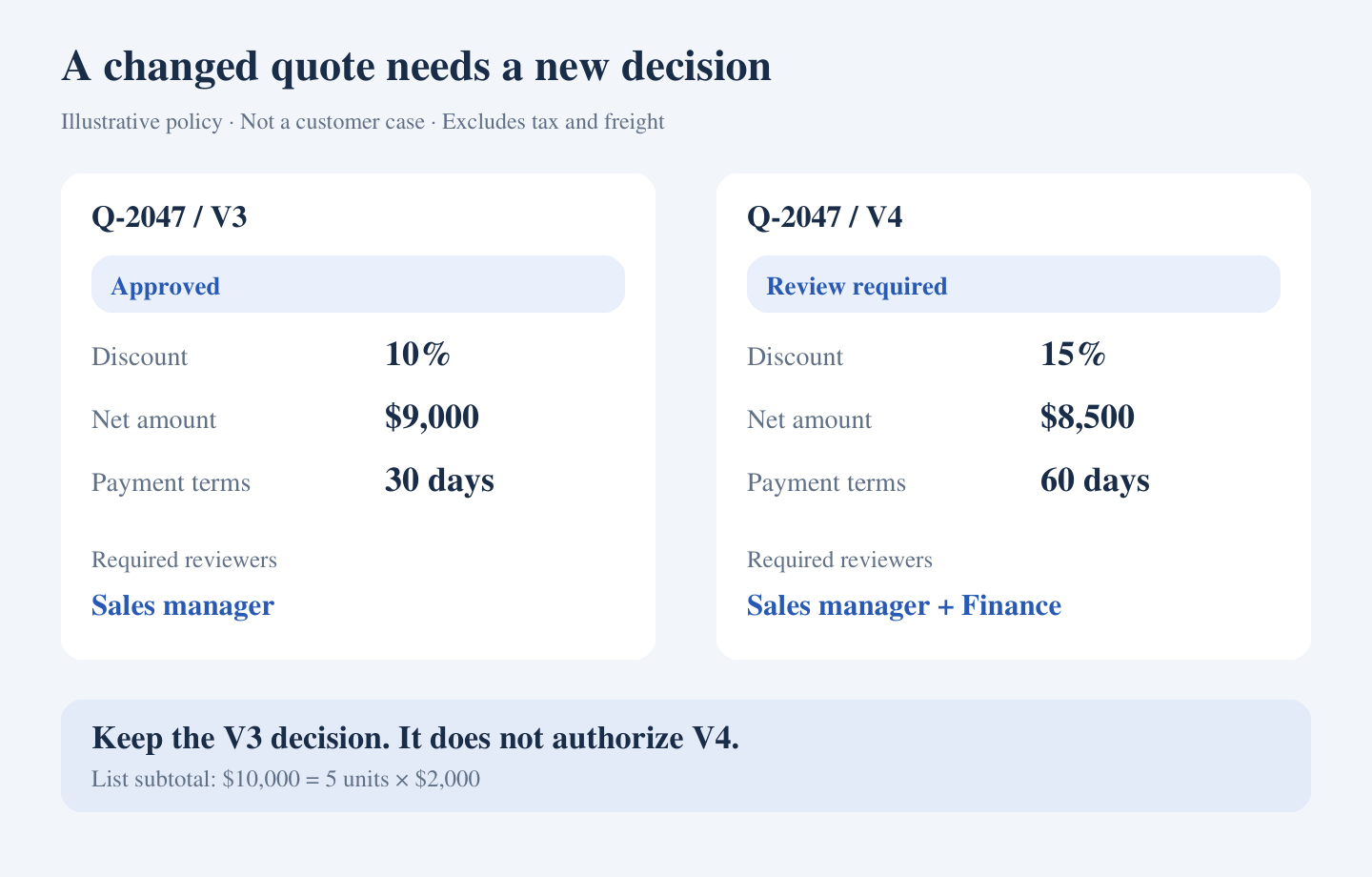
Illustrative policy: V3 approval does not authorize V4. Amounts exclude tax and freight.
The workflow should retain an identifiable snapshot of the submitted revision: line items, quantities, price source, discount, currency, payment terms, and the resulting document. A material change creates a new revision and reevaluates the approval requirements.
Your company should define which changes are material. Changing a contact's spelling might not require another decision; changing price, quantity, currency, scope, or payment terms often should. Make these rules explicit rather than treating every saved edit alike.
Connect three records without creating three competing versions
Before building screens or notifications, assign ownership to the information used in the quote.
- Pricing inputs: identify the approved price list or calculation model, its owner, and its version. If Excel remains the calculator, define the supported template and which cells or outputs the workflow reads.
- Approval record: retain the submitted revision, required reviewers, decisions, comments, and timestamps. Reviewers should see the changes that caused the request.
- CRM record: link the customer and deal to the current quote revision, approval status, and document. Write back only the agreed fields.
A practical status model separates “awaiting approval,” “approved,” “CRM update failed,” and “sent.” If an approved revision cannot be synchronized, employees need to see that state and its owner. An email notification alone should not make the CRM appear current.
Sending should be a separate, controlled action. Before release, check that the document still matches the approved revision and that any required synchronization has succeeded. This check cannot stop someone sending a separate attachment outside the controlled process, so agree the operating procedure as well as the software behavior.
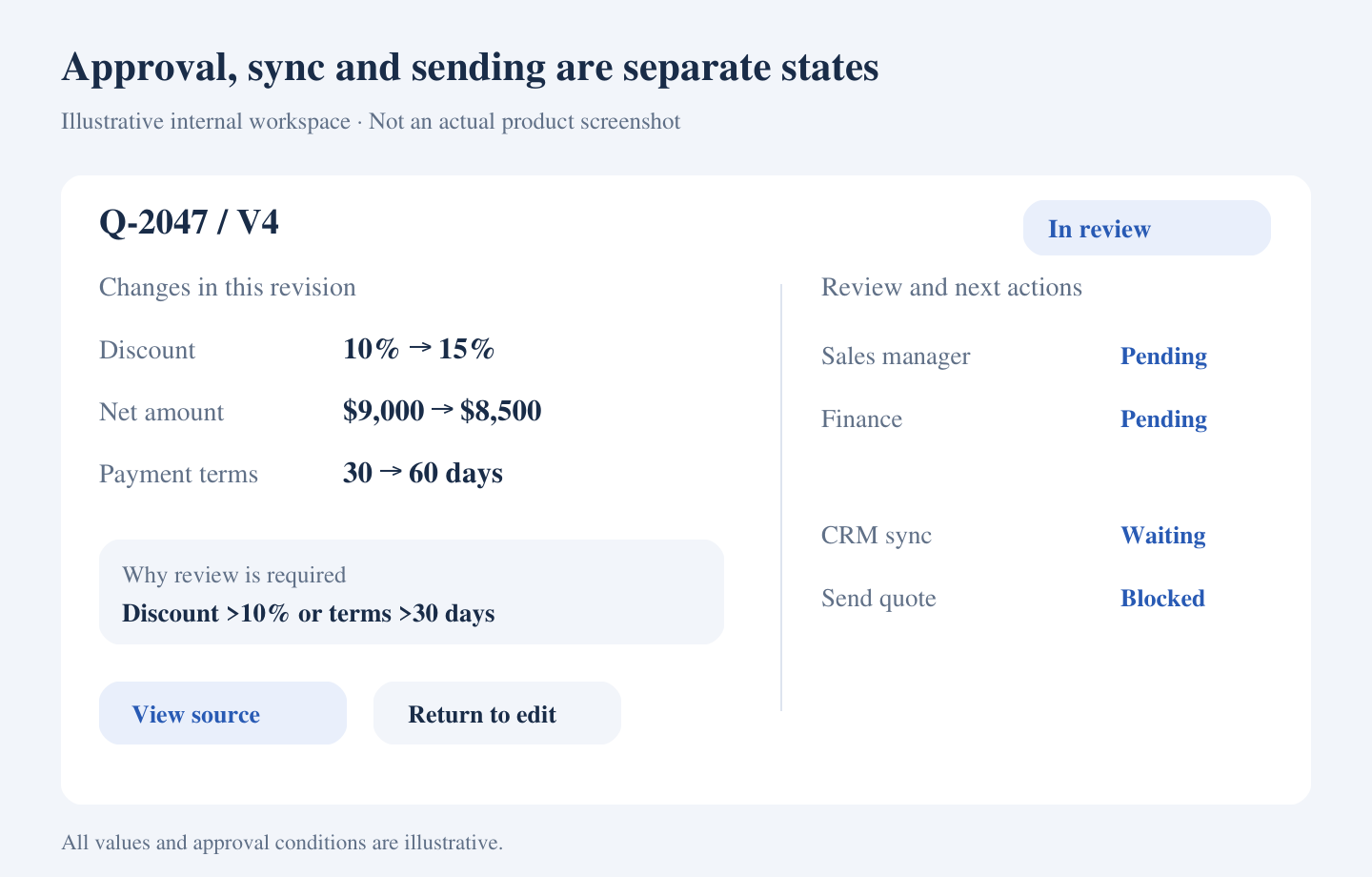
Illustrative internal workspace. Approval, CRM synchronization and sending remain distinct states.
Use native approvals when they fit the whole process
Inspect the capabilities of your existing CRM or quoting product before commissioning a new application. HubSpot's quote approval documentation, for example, describes property-based approval criteria and more detailed approval workflows, with availability depending on subscription and configuration. Test the behavior in the product and account you actually use.
There are three reasonable implementation routes:
Configure native quoting and approvals when pricing, document generation, permissions, and approval rules can live in the existing product. Check what happens when an approved quote changes, an approver is absent, or a user attempts to send early.
Connect existing tools with a workflow platform when the systems provide suitable interfaces and the review needs are relatively straightforward. Microsoft's Power Automate approval workflow guide includes document and sales quotation approvals. Connector access, licensing, file handling, and recovery still need assessment for your environment.
Build a focused internal application when material gaps remain: a proprietary pricing model, checks across systems, revision comparisons, or a review queue that standard interfaces cannot adequately support. Keep the scope around those gaps; replacing the entire CRM is a separate decision.
Where AI helps, and where explicit rules should decide
AI can assist with extracting a requested change from an email, drafting an exception explanation, or summarizing differences between documents. Those suggestions need a path for correction and confirmation.
Once the confirmed discount is 15% and payment terms are 60 days, explicit company rules should determine the required reviewers. The model should not invent a discount policy, grant approval, or turn an unanswered request into permission to send.
If the bottleneck is duplicate entry and chasing approvals, ordinary integration and workflow software may be enough. Include AI only where interpreting unstructured information adds useful value.
Scope the first release around one team and one quote family
Start with a defined sales team, a supported pricing template or product group, one CRM, and named approval owners. Include revision creation, validation, routing, decisions, CRM synchronization, and the permitted release action.
Agree how the workflow handles missing prices, unavailable approvers, withdrawn requests, and failed writes. After a timeout, check whether the CRM update already succeeded before retrying; do not create another quote blindly.
Request a proposal that separates configuration, integration, any custom application, testing, recurring licenses, and maintenance. The recurring work includes changes to pricing templates, approval policies, and connected systems. A quotation based only on the number of screens will miss these responsibilities.
Test the changed quote, not just the happy path
Ask an implementation partner to demonstrate these cases using representative, anonymized records:
- V3 is approved, then the discount and payment terms change. V4 is held for the required new decisions.
- Someone clicks an old approval link after V4 has replaced V3. The action cannot authorize V4.
- The pricing source is missing or its version is unsupported. The request waits for correction.
- The primary approver is absent. A documented delegation or escalation path applies; silence is not approval.
- The CRM connection fails after a decision. The failure is visible and recovery does not duplicate the record.
- A user tries to release an unapproved or superseded revision. The controlled release action blocks it.
Measure employee handling time separately from elapsed approval time. Also track rework, aged requests, synchronization failures, and attempts to release the wrong revision. Faster notifications are useful only if the team can complete the correct quote with less avoidable work.
When a custom implementation partner is useful
ZenAI's custom software development services cover workflow discovery, system integration, engineering, testing, deployment, documentation, and post-launch support. This is relevant when your approval process has important gaps that existing configuration cannot cover.
For a quote approval project, the initial assessment should establish the pricing source, revision rules, reviewer responsibilities, CRM access, and release conditions. The specific implementation and support scope need assessment against your systems.
Frequently asked questions
Can we keep our Excel pricing model?
Potentially. First confirm the workbook's owner, formulas, external dependencies, supported template, and revision handling. A file that needs uncontrolled desktop edits may require changes before it can serve as a reliable shared calculation source.
Do we need a full CPQ implementation?
Not necessarily. If product configuration and pricing are already manageable, an approval workflow may address the main gap. Evaluate a broader configure-price-quote product when complex configuration, pricing, and document generation are also central problems.
Should every quote edit require reapproval?
Define this with the business owners. Identify the fields that affect authorization, and specify how those changes trigger new review. Preserve the prior decision without applying it to a materially different revision.
What if we have no internal developers?
An external partner can build and maintain the workflow, but your team still needs owners for pricing, approval policy, and CRM access. Agree who changes the rules and how updates are checked before release.
Related reading
Why AI workflow automation needs internal tools in production
Bring a pricing workbook or template, an anonymized quote and revision, your approval rules, and the CRM fields involved. Discuss your quote approval workflow with ZenAI to define a practical first scope.
Was this article helpful?
Related Articles
Sales Order Entry Automation from Email to ERP
A practical guide to scoping email-to-ERP sales order entry automation, with a unit-conversion example, implementation choices, a transparent handling-time calculation and supplier evaluation questions.
Read MoreAI Technical Support Voice Agent: From Calls to Support Tickets
Build an AI technical support voice agent around your product knowledge, CRM, and ticketing system, with verified support tickets and reliable human handoff.
Read MoreAI Voice Customer Support for Medical Devices: After-Hours Calls and Troubleshooting
Explore AI voice customer support for medical device companies: handle after-hours calls, approved troubleshooting, support tickets, and safe human handoff.
Read More