
AI Integration Cost in 2026: Connecting AI to Your CRM and ERP
A practical guide to defining AI integration scope, separating implementation from ongoing costs, and comparing proposals using an explicitly hypothetical budget.
AI integration cost should cover the work needed to connect a defined business process to your existing systems, plus the cost of operating it after launch. Reading an ERP order status, preparing a CRM update for approval, and creating an ERP transaction are different scopes, even when each proposal says “CRM and ERP integration.”
For a concrete budgeting example, this guide uses an illustrative $48,000 implementation and $1,400 monthly operating budget. Implementation plus 12 full months of operation totals $64,800 before contingency and the exclusions below. These are planning assumptions, not market averages, a ZenAI quotation, or a customer result.
The useful purchasing question is what that budget includes, what it leaves out, and which changes would require a new estimate.
Define the first workflow before asking for a price
Consider an illustrative customer-service workflow. A customer emails a request for an order update. AI identifies the request, the integration matches the customer to a CRM account, and the ERP provides order status. An employee reviews a proposed response and CRM note, then approves recording the note.
The first scope contains one inbox, one CRM, one ERP, a supported request type, and a review queue. The ERP connection is read-only. The permitted CRM action records an approved note against an existing account. Customer messages are drafted for staff to send; the system does not send them automatically.
Creating orders, issuing refunds, changing delivery commitments, adding customer accounts, and migrating historical records remain outside this example. A supplier should state those boundaries in the proposal and acceptance criteria.
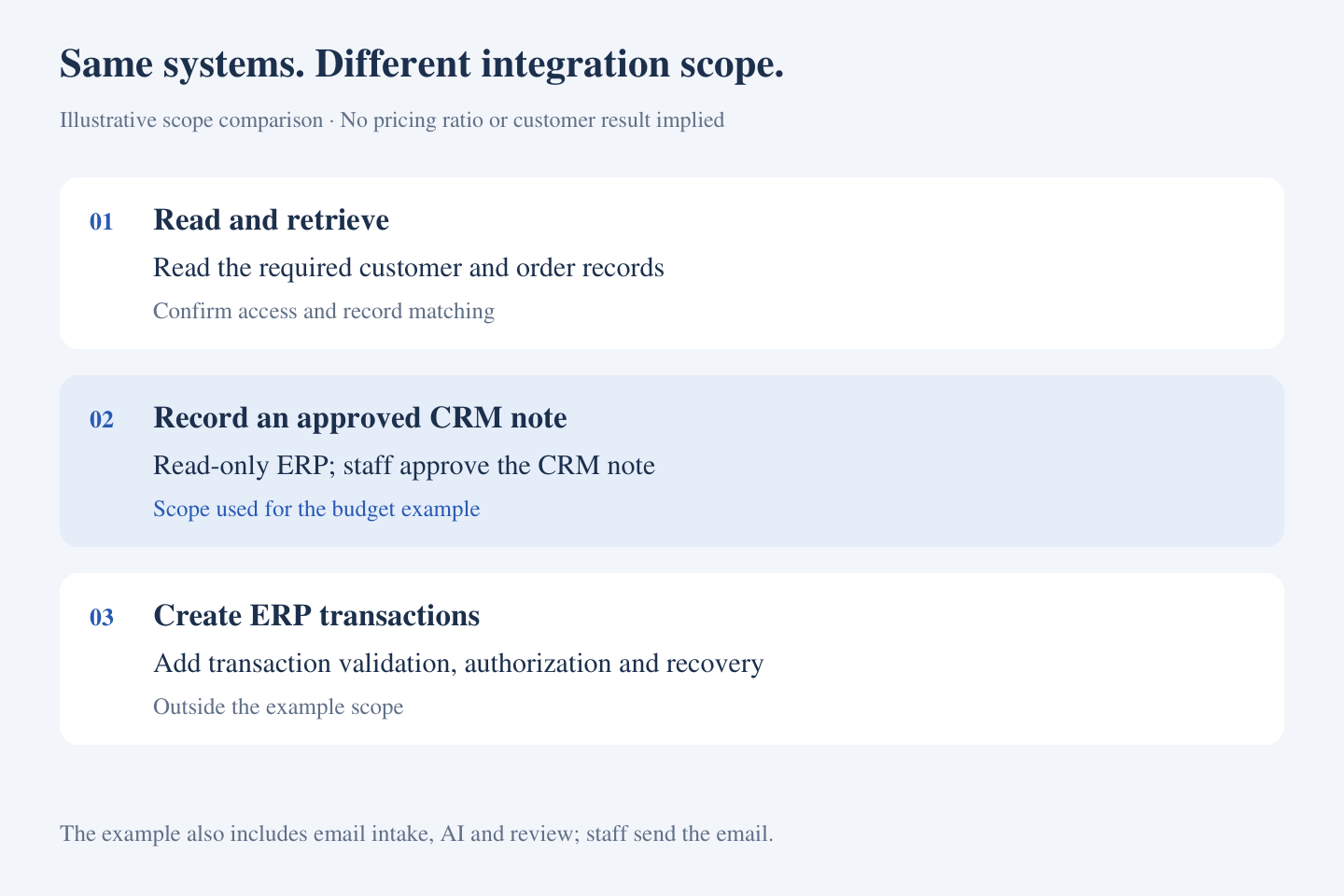
Write this scope in business terms first. Your technical team can then confirm the objects, fields, interfaces, credentials, and test environments needed to support it. Counting systems alone does not describe the implementation.
The work that changes an integration estimate
System access and the actions being authorized
Confirm that the relevant product, version, and subscription provide a supported way to read or update the required records. Existing connectors can reduce work when they support the needed objects and actions. Custom fields, restricted access, or a required intermediate system can add work.
For every write, ask how the system validates the target record, applies existing business rules, and recovers from an uncertain response. A connection that reads order status should not be priced as though it also creates and releases an order.
Customer matching and data preparation
An email address may belong to several customer records, and the reference in a message may not match the ERP identifier. Agree which records are authoritative, how approved mappings are maintained, and who resolves ambiguous matches. Include representative messy records in the assessment.
Separate the mapping needed for this workflow from a broader data-cleanup or migration project. Otherwise, the supplier and buyer may be pricing different jobs.
The employee workspace and acceptance tests
Reviewers need to see the request, matched records, proposed note, and reason for any exception. Editing, rejecting, and retrying a failed action require actual workflow behavior. These requirements should be visible in the estimate rather than hidden under “AI setup.”
Acceptance tests should cover correct records and permissions, uncertain matches, an unavailable ERP, rejected proposals, duplicate requests, and interrupted CRM writes. Include business-user testing, deployment, training, and handover.
A worked implementation budget
For the example workflow, assume 320 delivery hours at a blended $150 per hour. Both the hours and the rate are hypothetical and need replacement with an assessed proposal.
- Workflow and access discovery: 40 hours × $150 = $6,000.
- Data mapping and system integration: 100 hours × $150 = $15,000.
- AI step and review interface: 60 hours × $150 = $9,000.
- Testing, permission checks, and failure recovery: 80 hours × $150 = $12,000.
- Deployment, training, and handover: 40 hours × $150 = $6,000.
Total illustrative implementation: 320 hours and $48,000. This is an effort model, not a calendar-duration commitment. Access delays, stakeholder availability, and dependencies affect the schedule separately.
A fixed-price supplier may organize the price by milestones rather than hours. You should still be able to connect each milestone to deliverables, assumptions, acceptance criteria, and change conditions.
Include the cost of running the workflow
For the same example, assume the following monthly operating budget:
- Workflow platform or connector allowance: $300.
- Hosting, logs, and storage allowance: $50.
- Model usage allowance: $250, assuming 5,000 requests at an average $0.05 model cost per request.
- Support and maintenance allowance: $800 for an agreed service scope.
Total illustrative monthly operations: $1,400. None of these allowances represents a named vendor's current price. The $0.05 assumption must include the model calls and retries associated with a request; real usage needs measurement.
Budgeted implementation plus 12 operating months is therefore $48,000 + 12 × $1,400 = $64,800. If the buyer additionally reserves an illustrative 20% of implementation for contingency, that is $9,600, bringing the planning envelope to $74,400. The reserve is not an assumed supplier charge or a universal contingency rule.
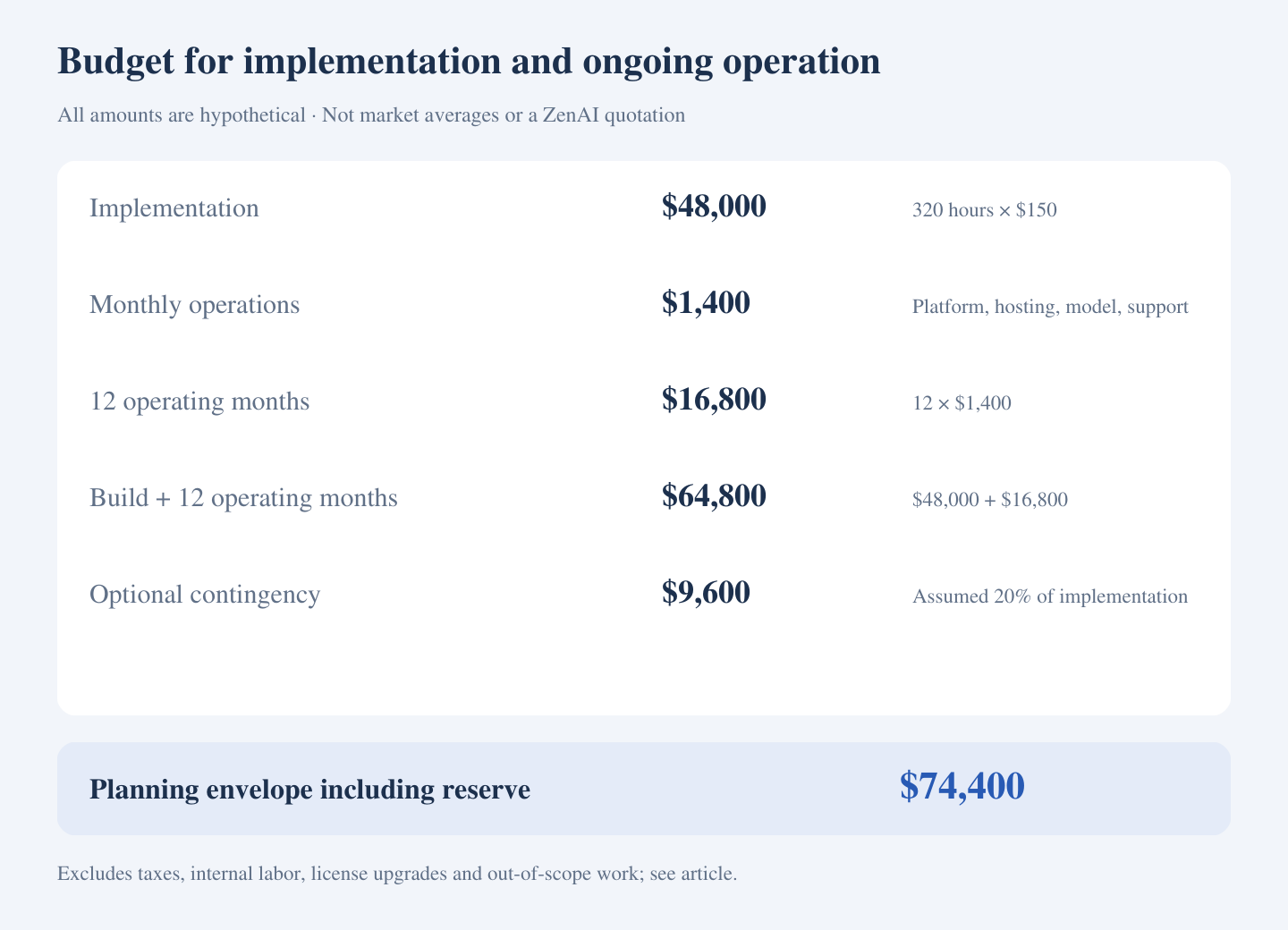
This envelope excludes taxes, internal staff time and review labor, CRM or ERP license upgrades, third-party access or implementation-partner charges not covered by the allowances, major data remediation, and work added after the agreed scope. Identify which of these apply before approving a budget.
Licensing needs its own check. Microsoft's Power Platform licensing overview distinguishes user, capacity, and consumption-based licensing and ties requirements to the products, features, data sources, and environments used. Verify entitlements for your particular design rather than assuming an existing subscription covers every connection.
For model operations, AWS's Generative AI cost optimization guidance emphasizes model selection, resource-consumption controls, and workflow boundaries. In procurement terms, ask how usage will be measured, what stops repeated calls, and who reviews unexpected cost increases.
Compare proposals on the same scope
Ask each supplier to mark the same requirements as included, optional, excluded, or dependent on your team. In particular, compare:
- The supported workflow, systems, record types, and allowed writes.
- Required licenses, interface access, data preparation, and business input.
- The review workspace, exception handling, and failure-recovery tests.
- Acceptance criteria and what evidence will demonstrate completion.
- Source code, configuration, account access, documentation, and handover responsibilities.
- Recurring charges, support hours, response arrangements, and what counts as a paid change.
A cheaper proposal may legitimately cover less work. It becomes comparable only when the difference is explicit. Pay particular attention to estimates that leave permissions, production testing, or ongoing ownership until after the demonstration.
Reduce scope where it reduces work
Check existing CRM or ERP features first. A supported native capability may already meet the requirement. A workflow platform can be suitable when its connectors and review functions fit. Custom integration becomes relevant when required mappings, actions, or operating controls remain unsupported.
A practical first phase can limit the request types, use read-only access where sufficient, and require approval before a defined CRM update. Expand after the team has measured the result. Keep record correctness and permissions in every phase.
Agree a pilot baseline for employee handling time, exception volume, completed requests, and operating cost per completed request. Count the work employees still perform. Released time may improve capacity without producing an equivalent cash saving.
What to bring to an integration assessment
Prepare system names and versions, the workflow steps, monthly and peak volumes, anonymized examples, required reads and writes, access constraints, and the people who own the records. Ask the provider to turn these into an assessed first scope and a clear list of unresolved dependencies.
ZenAI's AI integration services address system and field mapping, permissions, controlled writes, failure handling, and monitoring around existing business systems. The connector design, delivery effort, and support arrangement require assessment against your environment.
Frequently asked questions
Is there a standard price for connecting AI to a CRM and ERP?
A system count does not establish a standard price. The permitted actions, data quality, available interfaces, review requirements, and support scope determine the work. Use the example budget as a calculation template, not as a price prediction.
Is model usage included in the implementation fee?
Ask explicitly. Separate development and testing usage from production operations, and clarify whose accounts are billed, how usage is monitored, and whether the supplier adds a management fee.
Can we keep our existing CRM and ERP?
Often, if they support suitable access and the required workflow. Interface restrictions, unsupported versions, or missing business functions may require additional work. Establish that during assessment.
Can a provider quote a fixed price before discovery?
A bounded project can be priced against explicit assumptions. Where access, data, and requirements are uncertain, a separately scoped discovery phase can reduce uncertainty. Agree its outputs and decision point before commissioning a larger build.
Related reading
Why AI workflow automation needs internal tools in production
Ready to define the cost of your first integration? Bring your systems, sample records, and required actions, and discuss your AI integration scope with ZenAI.
Was this article helpful?
Related Articles
Quote Approval Automation: What Happens When a Quote Changes?
A practical guide to connecting quote approvals across Excel, email and CRM, with a worked revision example, implementation choices and acceptance tests.
Read MoreSales Order Entry Automation from Email to ERP
A practical guide to scoping email-to-ERP sales order entry automation, with a unit-conversion example, implementation choices, a transparent handling-time calculation and supplier evaluation questions.
Read MoreAI Technical Support Voice Agent: From Calls to Support Tickets
Build an AI technical support voice agent around your product knowledge, CRM, and ticketing system, with verified support tickets and reliable human handoff.
Read More