
How to Integrate an AI Voice Agent With Your Existing Phone System
Compare three ways to connect an AI voice agent to an existing support number. Use a single pilot branch to test routing, handoff and failure recovery.
You want an AI voice agent to answer some support calls, but customers already know your main number and your team relies on the queues behind it. What happens to those calls if the agent stops responding at 10 a.m. on a Monday?
Keep the existing number and routing in place. Start by sending one eligible branch to the AI voice agent, and give the phone platform a separate path around it. Before approving wider rollout, test the call from a real phone through to the person who receives it. Hearing the AI answer is only the first check.
Start where your inbound calls are routed today
Map the current path from the public number to its carrier, then to the phone platform, menu and queue. Find out who controls each step. A company may pay one provider for the number, use another system to route calls, and keep its customer records somewhere else. Ask the phone administrator to show which system can change routing for that number and which system can send an unanswered or failed call to a fallback route.
For the pilot, pick one business reason, one staffed queue and a small window when someone can watch the results. Write down which routing rule can be changed to switch the AI off, who has permission to change it, and which original route the calls will follow. Have that person rehearse the change before the first customer calls.
Choose an integration path your phone system supports
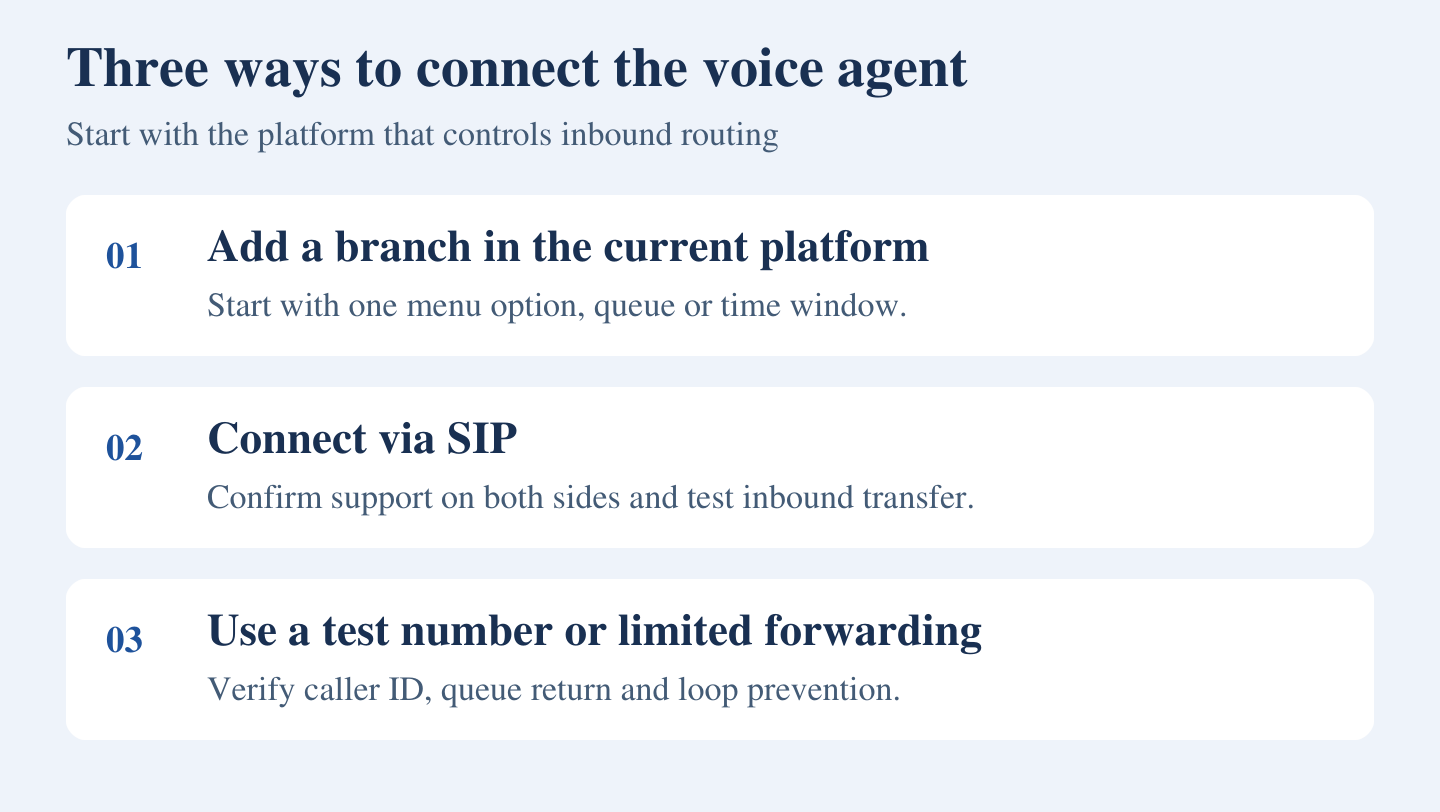
Use a route inside your existing phone platform
If the platform supports connecting an external voice agent within a call flow, route only an approved menu option, queue or time window to it. This keeps the existing number and gives telephony staff a single place to inspect the rules. Verify how your platform returns calls to a specific queue, what happens if the queue is full, and how the receiving agent sees context. For one platform example, Amazon Connect documents queue transfer and its capacity and error branches.
Use a SIP connection when the platform supports it
A compatible SIP trunk or SIP routing option can connect an existing phone system to another voice service. Confirm inbound routing and transfer behavior with both providers; an outbound connection working in a demo does not demonstrate that an inbound call can return to your support queue. Twilio's Elastic SIP Trunking documentation describes one approach to connecting IP communications infrastructure. If your existing setup uses Teams Phone Direct Routing, check Microsoft's Direct Routing prerequisites, including its certified Session Border Controller requirement.
Use a pilot number or forwarding when deeper integration is unavailable
A dedicated test number or limited forwarding rule can help you try the agent before modifying the main flow. Test whether the receiving service sees the correct caller number and whether it can return the call to a distinct queue endpoint. If it forwards back to the same menu option that launched the AI, the customer can end up stuck in a loop. Check call leg charges and recording behavior with the providers involved before expanding the forwarding route.
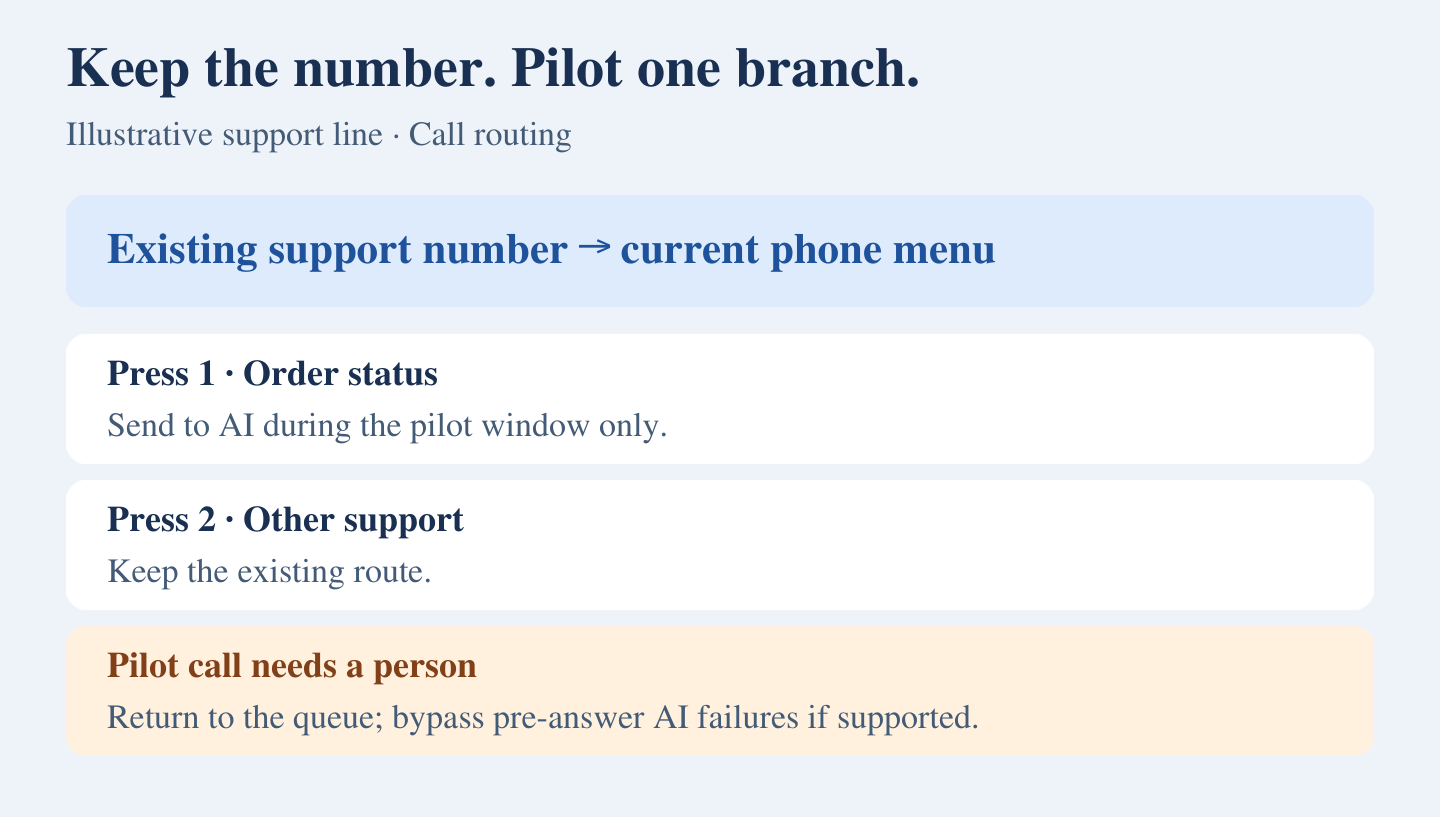
Example: keep the support line, automate one menu option
Consider a hypothetical distributor. On its existing support line, callers press 1 for order status and 2 for other support. During staffed pilot hours, only option 1 reaches the voice agent. Option 2 and the routing outside pilot hours stay as they were. Giving the voice agent an authorized, read-only status lookup narrows what the pilot has to prove.
If a caller asks for a person, cannot be verified, or the status lookup fails, send the call to the existing support queue. If the voice service itself cannot answer or times out before it has control of the call, the telephony layer should route around it where supported. The team must also test a service failure after the AI has answered: the recovery path depends on which platform still controls the call. If an in-progress call cannot be recovered in that setup, define what the caller should hear where possible and which route their next call will take. Test that outcome explicitly.
Give the receiving rep enough information to continue: the reason for transfer, verification status, permitted order reference and the last completed step. Confirm what arrives in the actual agent desktop. Amazon Connect contact attributes are one example of storing information about a contact; how it reaches the desktop still depends on the setup. If your voice platform sends context through a separate CRM integration, carry a shared call reference and test whether it opens the right record. A completed transfer and a correct screen pop are two separate results.
What to ask a vendor to prove before go-live
- The right call takes the right route. Call the published number from an outside phone. Run both menu options, inside and outside pilot hours. Confirm which number, menu and queue each call actually reaches.
- The handoff works under pressure. Ask for a person mid-call. Check that the caller reaches the intended queue, hears an appropriate message while waiting, and the rep receives the right context. Repeat with the queue full and with no agents available. Agree which fallback applies in each case.
- The system behaves when a dependency fails. Simulate a failed connection before the AI picks up, an interruption after it answers, and a CRM lookup timeout. Listen for silence and check for repeat menus or loops. Confirm where you can inspect the final outcome.
- Your team can disable the pilot. Ask the authorized owner to disable the AI branch, then call again from a real phone. Test the effect on new calls and establish what happens to calls already in progress. Record who restores service and how the AI branch gets re-enabled.
Agree on pass criteria before sending more traffic. Track correct routing among calls expected to use each route. Track calls that reached the intended queue with the required context among all attempted AI handoffs, and record failed or dropped calls separately. Include the caller's wait between asking for a person and reaching the queue. A high routing score can hide a handoff that takes too long or loses the reason for transfer.
Frequently asked questions
Can we keep our existing phone number?
Often, yes. If the current platform or carrier can route the chosen branch, forward pilot calls, or support an approved SIP connection, you can test AI on the existing inbound path. Verify who controls that route before assuming the number needs to be moved.
Does the AI need access to our CRM before the pilot?
It depends on the task. A routing-only pilot can start without CRM access. A status lookup needs a dependable source and verification rules. If the information lives in the order system, start with the minimum read permissions there.
What if we cannot pass context back to the support team?
You can test basic call routing first. When context matters, validate an alternative, such as displaying a short note in the existing agent workspace through a call reference. Set expectations honestly if callers will need to repeat information.
Start with the current call path
Bring the system that routes your main number, the branch you want to test, and the queue that should take over if it fails. Explore ZenAI's AI voice agent development services or discuss a pilot with ZenAI. If your team is still deciding which calls AI should take, see AI voice agents versus agent assist.
Was this article helpful?
Related Articles
AI Document Automation: Should You Buy, Configure, or Build?
Compare existing ERP features, packaged document software and custom integration by testing how each handles an invoice that exceeds recorded receipts.
Read MoreAI Customer Support Voice Agent vs. Agent Assist: Which Comes First?
Use two order support calls to choose between voice automation and agent assist, define what human reps receive, and measure the pilot against a baseline.
Read MoreFreight Document Automation: From Email to TMS
A practical guide to comparing freight documents, resolving revision and unit conflicts, and verifying approved updates in an existing TMS.
Read More