
Freight Document Automation: From Email to TMS
A practical guide to comparing freight documents, resolving revision and unit conflicts, and verifying approved updates in an existing TMS.
Freight document automation can take a bill of lading draft, commercial invoice, and packing list from an inbox and turn them into a shipment record your team can review. Its most useful job is often to surface disagreements before the data reaches your transportation management system (TMS).
Picture a packing list showing 48 cartons and a draft bill of lading showing 46. The invoice lists 480 pieces. All three numbers may have been extracted correctly. The next step is to work out whether the documents refer to the same shipment and revision, and whether they count the same thing.
Match documents to the shipment before comparing fields
Start with one shared inbox, one ocean export workflow, and an existing shipment record. Use a booking or job reference that your team can verify, alongside secondary checks such as the parties and shipment details. Send ambiguous matches to an operator. A matching filename or email subject is a clue, not a dependable shipment identifier.
Keep the original attachment, message reference, document type, and revision history together. A later email may contain an older attachment; use a business rule for marking the current version rather than always choosing the newest email.
Where your trading partners already exchange structured data, look at that route before building PDF extraction. The DCSA Bill of Lading standard is a reference for structured bill-of-lading processes in container shipping. Check what your partners actually support; adopting a standard does not by itself make their connections available.
48 cartons vs. 46: what should the workflow do?
Illustrative example. A single shipment’s packing list shows 48 CTN (cartons), its carrier draft B/L v2 shows 46 CTN, and its commercial invoice shows 480 PCS (pieces). The team confirms the packing list and draft cover the same shipment scope. The invoice quantity is stored separately and cannot resolve the carton count without an approved packing relationship.
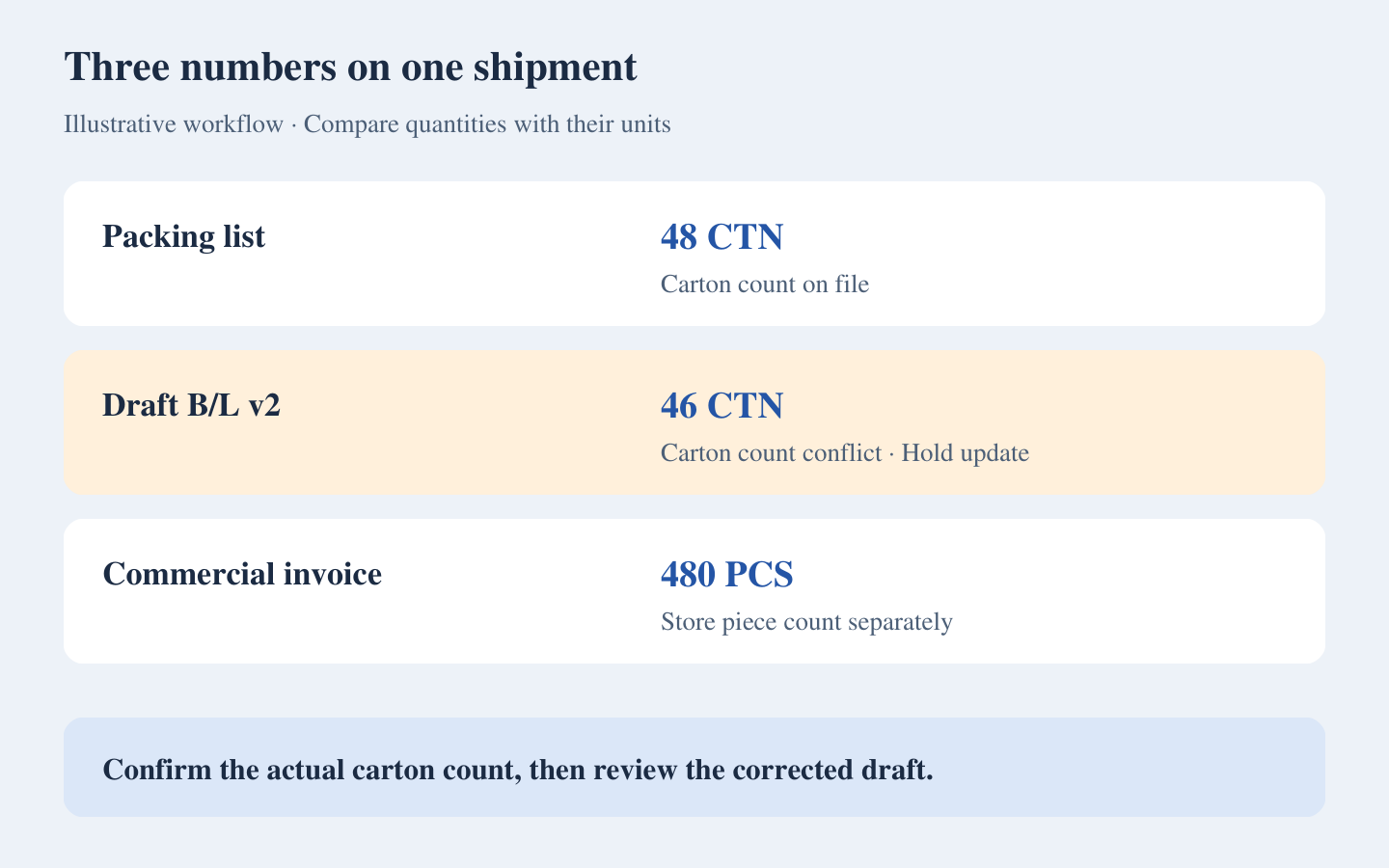
Show the operator both carton values, the source pages, and the document versions. Keep the package-count write on hold while the operator checks whether the packing list changed, a partial shipment is involved, or the draft needs correction. Ask the responsible party to confirm the shipping facts rather than letting the model infer a value.
In this example, the operator confirms 48 cartons with the shipping team and receives a corrected draft v3. The operator marks v2 as superseded and approves the new set. Only then is the existing shipment eligible for the agreed TMS update: package count 48 and package unit CTN. The pilot does not issue a bill of lading, submit a customs declaration, or create a shipment.
Define which fields can be compared
- Shipment identity: confirm the job reference and whether each document covers the same consignment. A consolidated record and a single shipment may legitimately show different totals.
- Quantities: store the number and unit separately. Do not equate pieces, cartons, and pallets without a confirmed relationship.
- Weight: compare gross with gross, net with net, and normalize units under a documented rule. Keep the original value visible to reviewers.
- Commercial terms: preserve invoice currency and value as separate fields. Ask your team which document owns each field and what discrepancies require review.
Extraction confidence can help prioritize review. It cannot tell you whether two correctly read values describe the same cargo. Microsoft’s Document Intelligence transparency note recommends testing confidence and extraction quality on representative documents. Set thresholds from your own pilot, and make business-rule conflicts trigger review independently of the score.
Make the TMS handoff verifiable
Start with a review queue or an approved export if the target system’s supported import or API path has not been confirmed. Once you connect it, give the integration permission to update only the fields agreed for the pilot. Before sending an update, verify that the approved source version is still current and that a more recent edit in the TMS would not be overwritten.
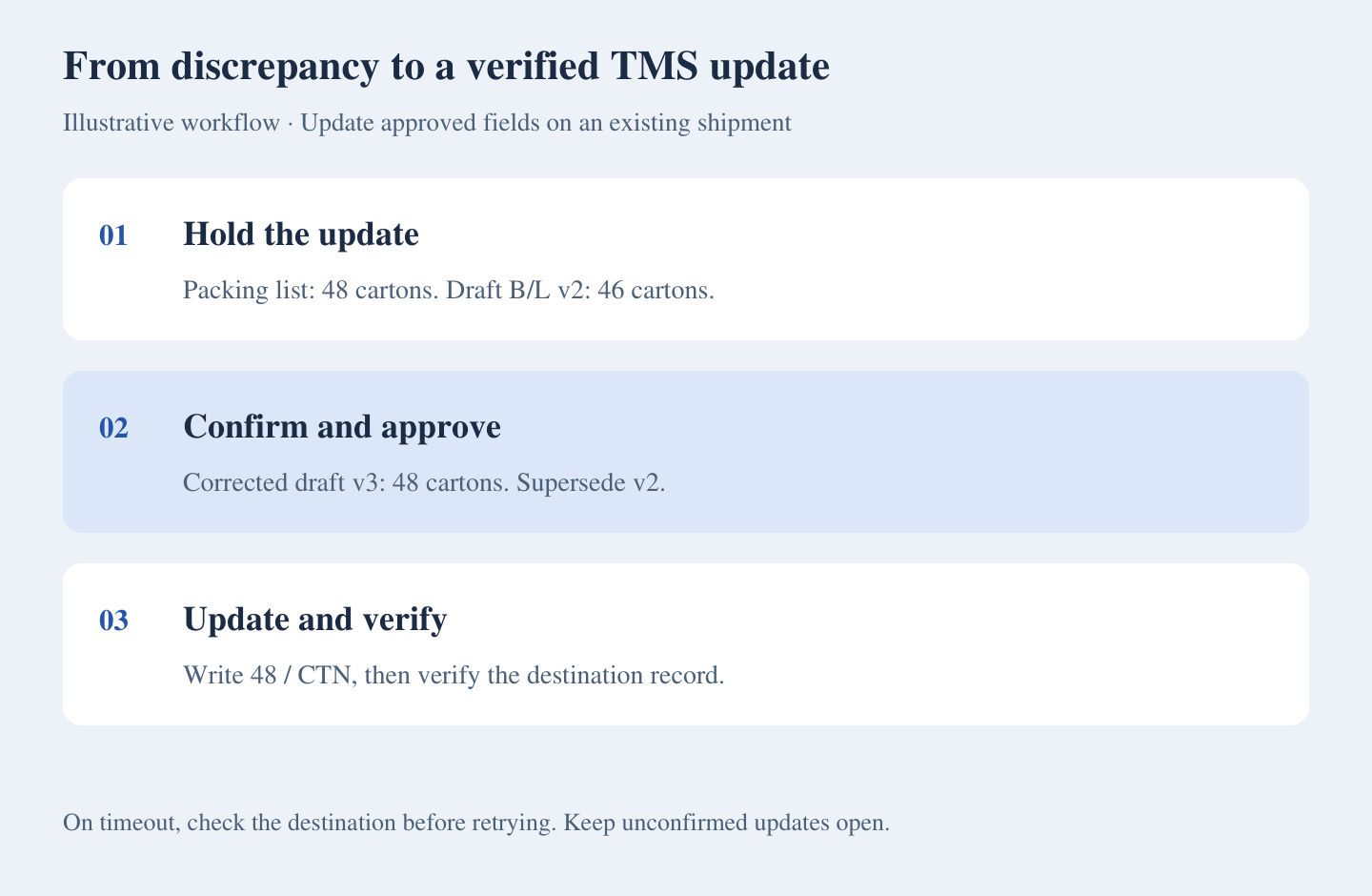
Store the approved shipment ID, source versions, field changes, reviewer, and update result. If the connection times out, look up the destination record before retrying. A duplicate attachment should not create another update, and a missing confirmation should remain visible as an unresolved exception.
What to compare before buying or building
Check your forwarding platform first. For example, CargoWise describes generating documents from booking and job data. If your problem is producing documents from records already in the platform, test that built-in path. If the problem is receiving documents from multiple parties, ask vendors to demonstrate matching and reconciling your incoming files on your specific setup.
For a pilot, pick one branch or lane, a small set of recurring document types, and one destination record. Bring examples of clean files, scanned files, split shipments, wrong job references, revised drafts, and duplicates. Include a test where the system receives v3 after someone has already approved v2.
Compare the new workflow with the current one on critical-field accuracy, operator time including review, the share of shipments needing intervention, and incorrect or duplicate updates. Record the number of shipment sets tested so a small sample is not mistaken for a production forecast.
ZenAI’s intelligent document processing services cover intake, extraction, validation, and review design. If you want to assess a freight document workflow, bring a few anonymized shipment sets and the fields your TMS should receive. Discuss your document workflow with ZenAI.
Frequently asked questions
Can we automate freight documents without replacing our TMS?
Start with a review queue outside the TMS. An export, import, or direct update can follow if your setup supports it and the team agrees the field mapping and permissions.
Can AI choose which document is correct when values disagree?
It can flag the difference and present evidence. Assign an owner and source rule for each field. Conflicts without a clear rule or reliable evidence should go to the person responsible for the shipment.
Which documents should we pilot first?
Choose a frequent set that your team already reconciles, such as a draft bill of lading, commercial invoice, and packing list for one ocean export workflow. Include revisions and mismatches in the test.
Can we measure the savings before connecting the TMS?
Yes. Time how long operators take to review and prepare an approved record in parallel with the current process. Track any manual import or re-entry that remains; this measures the review stage, while a connected pilot can test actual update quality.
Was this article helpful?
Related Articles
AI Integration Cost in 2026: Connecting AI to Your CRM and ERP
A practical guide to defining AI integration scope, separating implementation from ongoing costs, and comparing proposals using an explicitly hypothetical budget.
Read MoreQuote Approval Automation: What Happens When a Quote Changes?
A practical guide to connecting quote approvals across Excel, email and CRM, with a worked revision example, implementation choices and acceptance tests.
Read MoreSales Order Entry Automation from Email to ERP
A practical guide to scoping email-to-ERP sales order entry automation, with a unit-conversion example, implementation choices, a transparent handling-time calculation and supplier evaluation questions.
Read More