
AI Document Automation: Should You Buy, Configure, or Build?
Compare existing ERP features, packaged document software and custom integration by testing how each handles an invoice that exceeds recorded receipts.
An invoice arrives for 100 units. Your purchase order also says 100, but the ERP shows that only 80 have been received. The AI reads every number correctly. Can it send the invoice through for approval, save it as a draft, or should it flag the missing receipt? The software demo may end at extraction. Your team still has to make that decision.
Buy AI document automation software when it can handle your actual documents and exceptions in the systems you already use. Build a custom integration when a ready-made tool can read the documents, but your team needs its own rules for checking, approving, or updating records. Before either, see what your existing ERP or accounts payable system can already do.
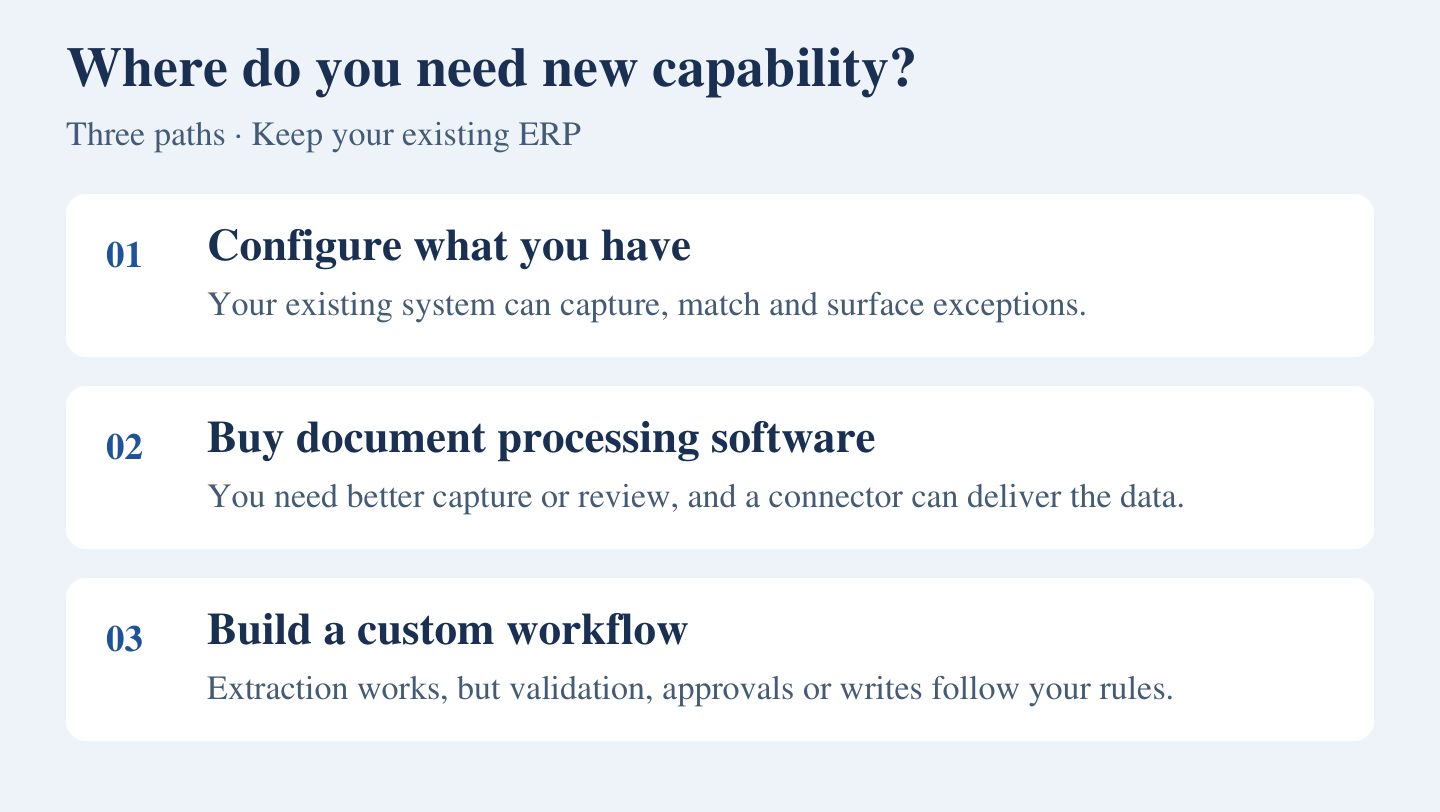
Three ways to automate documents without replacing your ERP
1. Configure a feature you already have
Start here if most documents fit an existing intake process and the people who resolve exceptions already work in your ERP or accounts payable system. Test whether the built-in feature can capture the fields you need, match them to the correct record, and show a reviewer what failed. A connector listing is useful; a draft in the correct company and vendor record is stronger evidence.
2. Buy a document processing product
A packaged product can make sense when your existing system is weak at handling scans, multiple layouts, or review queues, and the new product can pass approved data to it. Ask to see a reviewer correct a line item, open the source page, and see what happens if the destination rejects the update. Find out whether the packaged connector supports the level you need: an invoice header, individual lines, or both.
3. Add a custom workflow around an existing extractor
Choose this route when the work after extraction depends on your rules: matching invoices against multiple receipts, checking company-specific tolerances, or assigning exceptions to different teams. You can keep a prebuilt extraction service and customize only how the data is validated, reviewed and written. If your team has limited AI engineering capacity, agree up front who owns failed jobs, rule changes and new document layouts after launch.
Use the 100-unit invoice to test what happens after extraction
In this illustrative test, a supplier invoices 100 units, the purchase order is for 100, and the ERP records a receipt of 80. Assume the units match and your pilot rule requires review when the invoice exceeds the received quantity. As a reference, Microsoft's Dynamics 365 documentation describes three-way matching across invoice, purchase order and product receipt data.
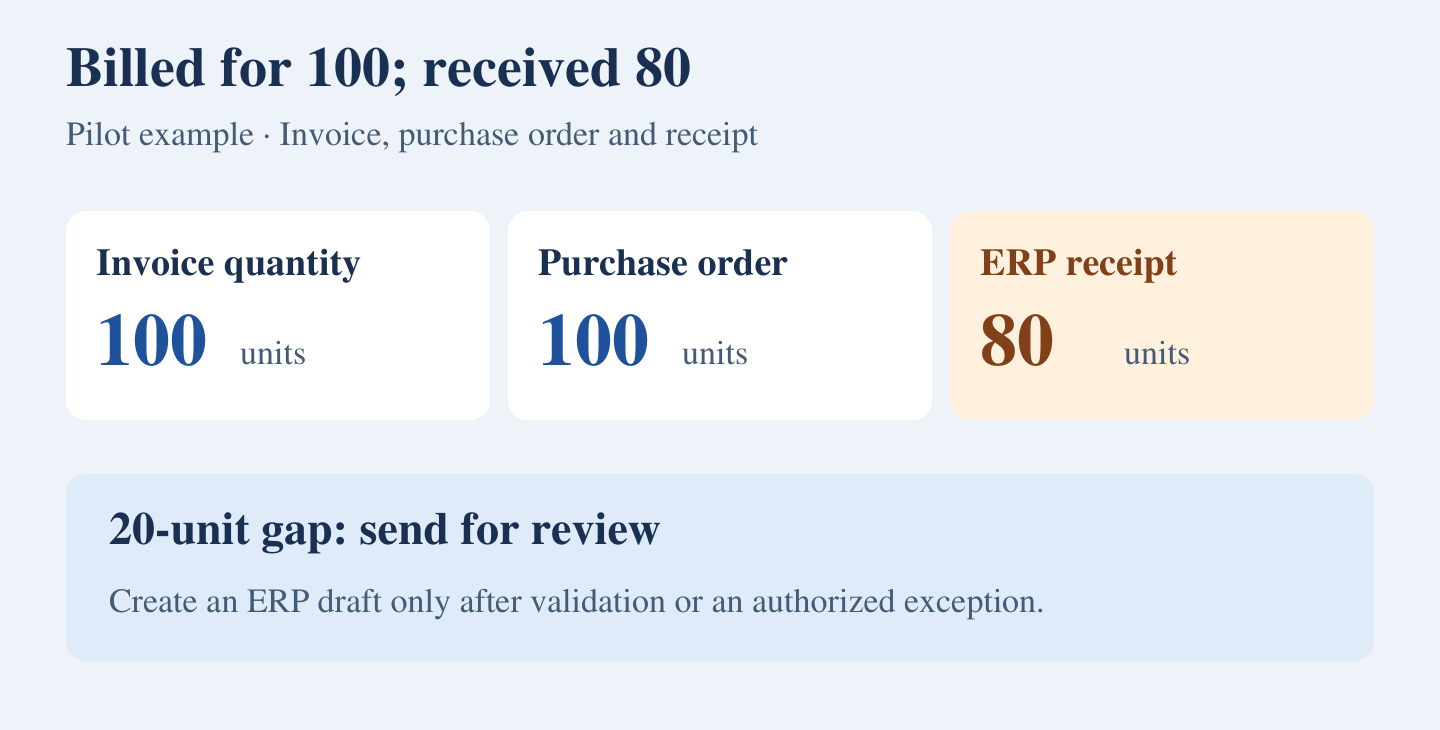
Show the reviewer the invoice line, the matched purchase order line, and the receipt behind the 20-unit difference. The missing 20 may be in transit or may already be on site without a posted receipt; the tool cannot settle that from the invoice. Keep the line in review until the relevant team confirms what happened. In this pilot, the only permitted ERP write is a draft after the rule is satisfied or an authorized exception is recorded. Payment approval stays in the existing process.
Run the same case again with the invoice resent by email and with a simulated timeout after draft creation. The workflow should find the existing draft or mark the outcome as unconfirmed for investigation before retrying. Ask the vendor to show the destination record and the log. A green check in the extraction screen does not confirm that the ERP received the right record once.
Give each vendor the same test pack
- Separate setup examples from the blind test. Build the test from documents that represent real volume and common failures: clean PDFs, scans, new layouts, missing purchase order numbers, partial receipts and duplicates. Mark the correct field values and expected workflow outcome. Give each option the same documents and rules.
- Score extraction and business outcomes separately. For extraction, compare key fields and line items against the labeled examples. Google Cloud's Document AI evaluation guide shows how labeled test data can be used to measure precision and recall. For workflow, count correctly created drafts among all test cases expected to create one. Separately count exceptions sent to the correct owner with the required evidence among all cases expected to be held. Check for improper or duplicate drafts in both sets.
- Make confidence actionable. Microsoft's Document Intelligence transparency note recommends testing on representative documents and using confidence to inform review decisions. Use it to flag fields for checking. Also run a business rule check: a confidently read quantity of 100 can still fail against a receipt of 80.
- Have a real reviewer finish the exception. Track time spent on correction and follow-up, not only processing speed. Make sure the reviewer can see the source, confirm the reason for a hold and resume work after receiving information. Before rollout, agree which failures stop the pilot, such as posting without authorization or creating a duplicate draft.
Compare costs over the same scope and period
Ask every option to price the same document volume, number of systems, review steps and write permissions. Include setup and connectors, document or page charges, reviewer time, monitoring, and changes to formats or rules. Check what is included when an ERP endpoint changes. A low price per page is hard to compare if one proposal still requires people to enter lines by hand.
For a useful purchasing conversation, ask for the owner and a way to export each of these: field mappings, rules, approved data, exception history and test samples. That tells you what your team can maintain or take to another provider later.
Frequently asked questions
Can we buy the extraction and build only the rest?
Yes. A common design is to use a document service to read invoices and connect its output to your own validation, review and ERP draft creation. Test both parts together against the same business rules.
Do we need to train our own AI model?
Try a suitable prebuilt extractor on a blind sample first. Consider tuning or a custom extractor if key fields or layouts repeatedly fail, after checking input quality and label consistency. If the correct fields are already coming through, the work may be in matching or review instead.
What if our ERP cannot accept draft writes?
Start with a review queue and a structured export that your team can reconcile and import. Measure how much manual work remains. Include a verified draft write in the next phase only when you have a supported interface and an owner.
Start with one document and one destination
Bring a document type, the ERP record it should update, and a few redacted exceptions. Explore ZenAI's intelligent document processing services or scope a pilot with ZenAI. For a related workflow outside finance, see how freight teams review conflicting documents before updating a TMS.
Was this article helpful?
Related Articles
AI Customer Support Voice Agent vs. Agent Assist: Which Comes First?
Use two order support calls to choose between voice automation and agent assist, define what human reps receive, and measure the pilot against a baseline.
Read MoreFreight Document Automation: From Email to TMS
A practical guide to comparing freight documents, resolving revision and unit conflicts, and verifying approved updates in an existing TMS.
Read MoreAI Integration Cost in 2026: Connecting AI to Your CRM and ERP
A practical guide to defining AI integration scope, separating implementation from ongoing costs, and comparing proposals using an explicitly hypothetical budget.
Read More